Fence Estimating Software for Contractors
Fence estimating software should turn a site sketch into a priced, sendable quote in under a minute. Most contractor estimating tools weren't built that way. They're generalist platforms — adapted from HVAC, plumbing, or remodeling — that treat a fence quote like any other line-item job. You re-key measurements into a calculator, build a quote in a separate document, configure tax tables by province, and hope the math holds up when the customer asks questions.
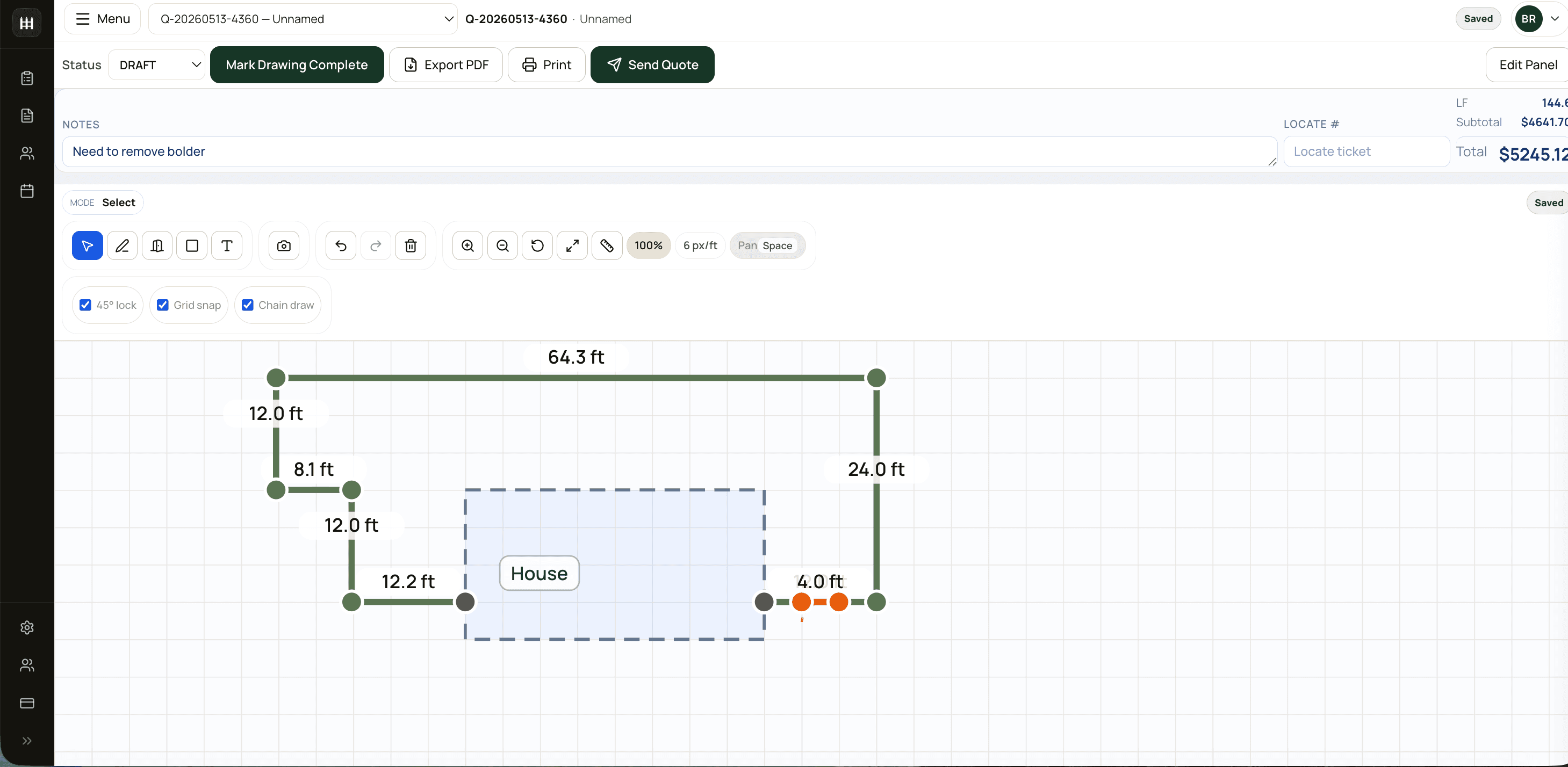
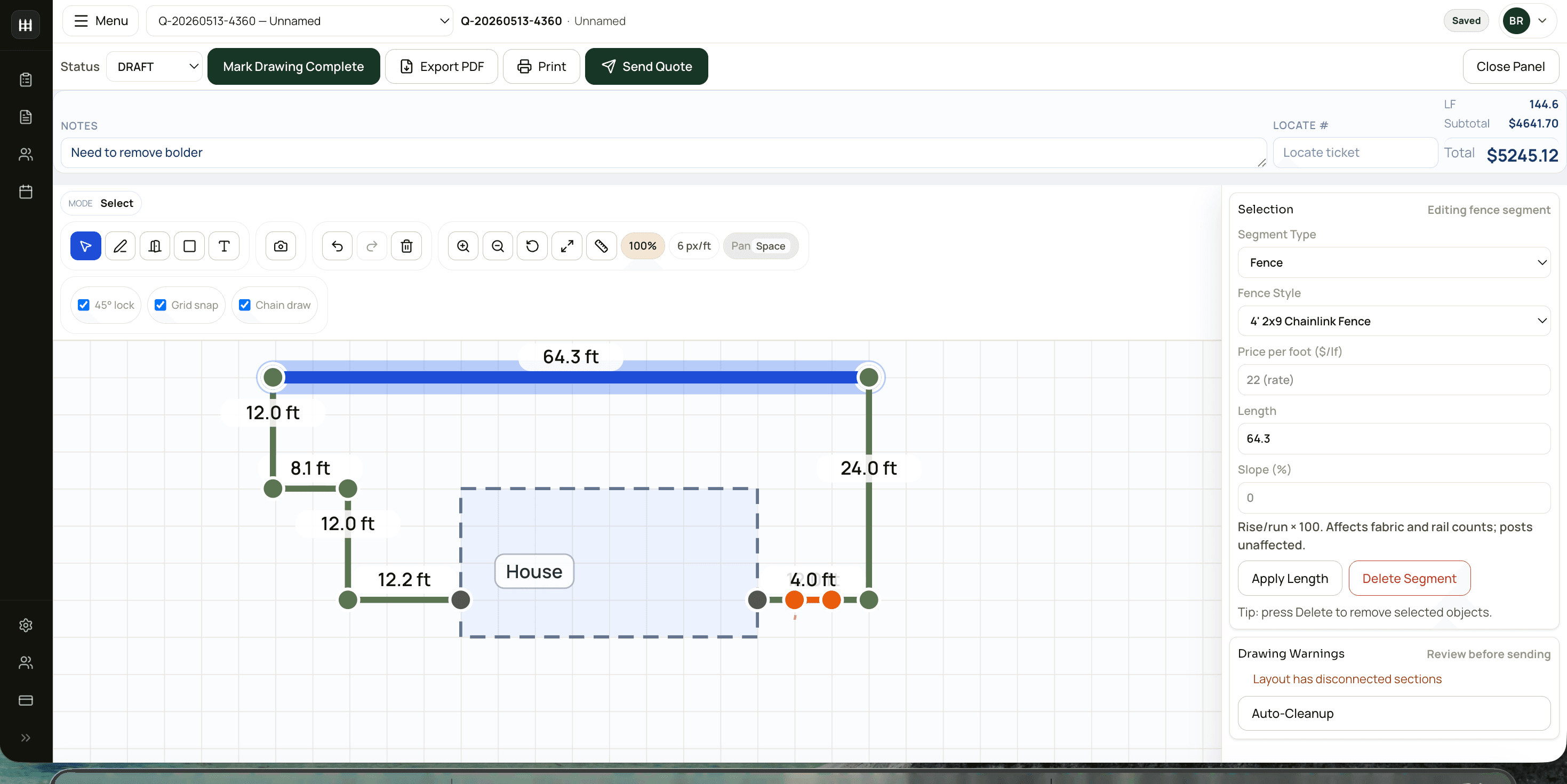
FenceTracer is fence estimating software in the literal sense: the drawing canvas IS the takeoff. Snap a layout, the linear feet, post counts, gate hardware, and labour fall out automatically. Add the customer's install address and the right tax (HST, GST + QST, GST + PST, or GST-only) is applied without configuration. The result is a quote that took 30 seconds to build, priced from your own catalogue, ready to send.
30s
Sketch to priced quote
$180
CAD/month, flat
Unlimited
Users & projects
13
Provinces & territories supported
Why fence-specific estimating software matters
Most contractor estimating software was built for trades where every job is a unique scope and every quote is constructed line item by line item. Fence is different. Most fence quotes are linear-foot math against a small set of repeating assemblies — post, rail, fabric, gates — with regional sales tax and a measurement that's either drawn or read off a tape.
That mismatch is why generic estimating tools feel heavy when you adapt them to fence: you build the spreadsheet logic yourself, you maintain the catalogue manually, and your estimators learn a workflow that doesn't match how fence sales actually happen. Software built for fence specifically inherits the right defaults — fabric per LF, posts per 10 LF, end posts per gate — so estimators stop counting parts and start selling.
How FenceTracer's fence estimating workflow works
- Draw the job. Click corners on the canvas, snap to grid or lock to 45°, and the geometry engine computes linear feet, slopes, and angles automatically. Multi-segment runs, gates, and obstacles each take a single click.
- Pick fence styles per segment. Chain link, wood privacy, ornamental aluminum, vinyl, composite — set a default and override per segment. Each style is mapped to your catalogue, so the takeoff produces the right SKUs.
- Quote is priced live. As you draw, the quote builder pulls the latest cost from your pricing profile and applies your margin. Add gates, hardware, removal, and labour — they roll into the same priced output.
- Send the PDF. A professional, branded quote PDF with your logo, terms, and signature block. One click. The customer receives it by email; you see when they open it.
- Hand off to the crew. Approved quotes become projects in the workflow board. Crews see the job, the drawing, and the material list on their phone via the FenceTracer worker app.
The whole loop — draw, quote, send, install — runs inside one tool, which is why estimators stop bouncing between AutoCAD, Excel, and QuickBooks.
What good fence estimating software should include
- Drawing-driven takeoff. If the linear feet on the quote don't come from the drawing, the drawing is decoration. Real fence estimating software treats the canvas as the source of truth.
- Per-segment fence styles. A single run can change style midway (e.g., 8' privacy on the property line, 4' picket at the front). Software that forces one style per quote forces you into manual workarounds.
- Slot-mapped catalogue. Posts, rails, fabric, gates, fittings, labour — each item maps to a known slot, with a multiplier per LF. Without slot mapping, you count parts manually on every quote.
- Canadian tax automation. Eight different sales tax models across provinces. Fence estimating software for Canada should derive the right rate, label, and remittance jurisdiction from the install address.
- Live catalogue pricing. Import your supplier pricebook (Master Halco, Wholesale Fence Supply, Atlas, etc.) and quotes always reflect current cost. Margin per job becomes visible, not a guess.
- Mobile and field handoff. The estimator builds the quote; the foreman runs the install. The estimating tool should hand the job off cleanly without re-keying.
- Auditability. Quote revisions, who changed what, customer responses, sent dates — every fence shop eventually needs the trail.
How FenceTracer compares to generic estimating software
| Feature | FenceTracer | Generic contractor estimating software |
|---|---|---|
| Drawing-driven takeoff | Native — canvas IS the takeoff | Add-on or none (CAD bolt-ons) |
| Fence catalogue out of the box | Toronto 2025 catalogue pre-loaded | Generic — you build it |
| Per-segment fence styles | Yes — one quote, mixed styles | Usually one style per quote |
| Canadian tax (HST/GST/QST/PST) | Automatic by install province | Manual rate tables |
| Vendor pricebook import | CSV — Master Halco, Wholesale, Atlas | Generic line-item import |
| Pricing | $180 CAD/month flat, unlimited users | $50–$400 per user/month |
| Time to first sent quote | Same day | 1–4 weeks of setup |
| Crew mobile handoff | Built-in worker app (iOS/Android) | Separate product or none |
| Free trial | 30 days, no credit card | Demo or 14-day trial |
Who FenceTracer's fence estimating software is for
- Small to mid-size fence contractors (1–20 crew) who want estimating speed without enterprise pricing.
- Canadian fence shops that need HST, GST + QST, and provincial PST handled without manual rate maintenance.
- Estimators who hate Excel — the spreadsheet workflow works but eats hours every week and produces inconsistent quotes between team members.
- Shops that draw on paper today and want to professionalize their proposals without learning AutoCAD.
- Multi-style operators (chain link, wood, ornamental, vinyl) who need one quote to combine styles across a single job.
If you do 10+ quotes a month and your current estimating process touches more than one tool (drawing app, spreadsheet, Word doc, accounting software), you're the target user.
Pricing
FenceTracer is $180 CAD/month, flat. Unlimited users, unlimited projects, unlimited customers. No per-quote charges, no implementation fee, no annual commitment. A 30-day free trial — no credit card — gets you to your first sent quote on day one.
That's roughly the cost of one redo on a missed-measurement quote. The math pays back fast.
Start estimating fence jobs in 30 seconds
Draw the job on FenceTracer's canvas, send a priced quote, and hand the install off to your crew — all in one tool. 30-day free trial. No credit card.
Start 30-day free trial →FAQ
Frequently asked questions
What is fence estimating software?+
Fence estimating software helps fence contractors produce accurate, professional quotes from job-site measurements. The best fence-specific tools (like FenceTracer) treat the drawing as the source of truth — sketch the layout and the linear feet, post counts, gate hardware, and pricing fall out automatically, replacing the spreadsheet-and-CAD workflow most shops use today.
How is fence estimating software different from general contractor software?+
Generic contractor software (ServiceTitan, JobNimbus, Buildertrend) is built for industries where every job is a unique scope. Fence work is largely linear-foot math against repeating assemblies — that mismatch means estimators spend hours adapting generic tools to fence. Fence-specific software ships with the right defaults (fabric per LF, posts per 10 LF, slot-mapped catalogues) so estimators can build quotes in seconds, not minutes.
Does FenceTracer work for chain link, wood, ornamental, and vinyl fences?+
Yes — all of them, plus composite and welded steel. Each fence style maps to its own catalogue slots with the right per-LF math. A single quote can mix styles across segments (e.g., 8' wood privacy on the property line, 4' picket out front).
How does FenceTracer handle Canadian sales tax?+
Tax is derived automatically from the install address. HST in Ontario and Atlantic provinces, GST + QST in Quebec, GST + PST in BC/MB/SK, GST-only in Alberta and the territories. The right rate, label, and remittance jurisdiction appear on the quote without manual setup.
Can I import my supplier's pricebook?+
Yes. CSV import is built in — Master Halco, Wholesale Fence Supply, Atlas, and any custom catalogue. The import maps to FenceTracer's slot system so the same posts and rails apply consistently to every quote.
Does FenceTracer replace AutoCAD or ArcSite?+
For fence-specific estimating, yes. FenceTracer's drawing canvas is purpose-built for fence layouts — multi-segment runs, gates, slopes, obstacles, and snap-to-grid. It doesn't replace AutoCAD for architectural drawings, but you won't need a separate CAD tool to produce a fence takeoff.
How long does setup take?+
Same day. The Toronto 2025 fencing catalogue is pre-loaded, your team can sign up unlimited users at no extra cost, and the 30-day trial doesn't require a credit card. Most shops send their first quote on day one.
Related reading
- Fence quote software — what proposal automation looks like when the drawing drives the quote
- Fence contractor software — full operations stack beyond estimating
- Chain link fence estimator — fence-style-specific workflow
- Wood fence estimator — wood-privacy-specific workflow
- The Complete Fence Estimating Software Guide — evaluation framework for picking any estimating tool
- FenceTracer vs ServiceTitan — when enterprise field service software is and isn't the right fit
- FenceTracer vs JobNimbus — comparing against general contractor software