Fence Quote Software for Contractors
A quote is the only deliverable in fence estimating that the customer actually sees. Everything else — the catalogue, the takeoff, the margin math — is internal. So fence quote software has two jobs: get the math right, and make the document look like the work is worth paying for.
FenceTracer is fence quote software that does both. The drawing canvas produces an accurate priced takeoff in seconds. The PDF that comes out the other end is branded, itemized, tax-correct, and ready to send — no Word document, no manual cleanup, no "I'll get you the proposal tomorrow" lag that loses deals.
60s
Draft to sent quote
$0
Per-quote charges
100%
Tax-correct PDFs
Unlimited
Quote revisions
Why most fence shops still send slow, ugly quotes
The typical fence quote workflow looks like this:
- Estimator measures the site (paper sketch or phone notes).
- Back at the office, transfers numbers into a spreadsheet.
- Copies the spreadsheet output into a Word doc with the company letterhead.
- Manually applies HST (or QST + GST, or PST + GST — depending on province).
- Emails the Word doc or a PDF export.
- Repeats steps 2–5 every time the customer asks for a revision.
This works. It also takes 30–90 minutes per quote, looks inconsistent between estimators, and produces tax errors when nobody remembers to update rates. The shop with fence quote software that ships the same proposal in 60 seconds — branded, accurate, signable — wins the deal more often than the math suggests.
How FenceTracer's quote builder works
Draw → price → send. That's the whole loop.
- Draw: snap a fence layout on the canvas. Lengths, posts, gates, and slopes are computed automatically.
- Price: the catalogue maps every segment, gate, and obstacle to your SKUs with current cost; your margin rule applies; tax is derived from the install address.
- Send: one click produces a branded PDF and emails it to the customer. The quote screen shows when they open it.
Revisions take seconds: change a measurement on the drawing, the quote regenerates, hit send again. No Excel formulas to update, no Word doc to re-export.
What good fence quote software should produce
A real fence quote PDF should include all of this, automatically:
- Company branding — logo, address, license number, contact info.
- Customer details — name, install address, customer-supplied notes.
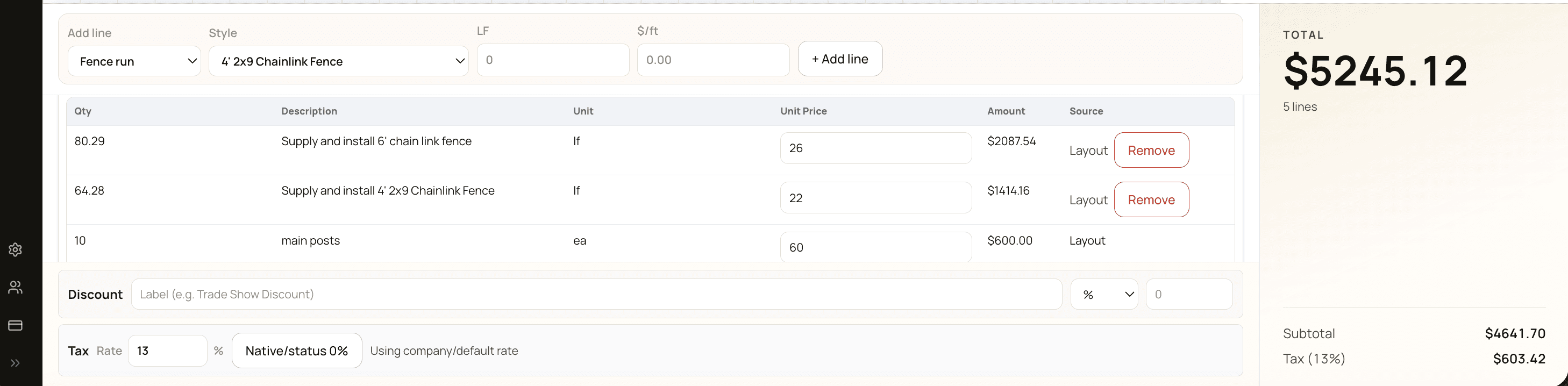
- Itemized scope — by fence run (with linear feet and style), gates (with hardware), removals, labour, and any extras. Customers want to see what they're paying for; one-line "fence installation" quotes lose deals against itemized competitors.
- Materials breakdown if requested — some commercial buyers want this; FenceTracer can show or hide.
- Subtotal, tax line(s), total — with the correct provincial tax model.
- Terms and conditions — payment schedule, warranty, exclusions, cancellation policy.
- Signature block — for in-person signatures, plus an e-sign link in the emailed version.
- Quote number and expiry date — so the customer knows the offer isn't open-ended.
FenceTracer's quote PDF includes all of this by default. You set the branding once; every quote inherits it.
How FenceTracer compares to spreadsheet + Word quoting
| Feature | FenceTracer | Spreadsheet + Word quote |
|---|---|---|
| Time per quote | 60 seconds | 30–90 minutes |
| Math accuracy | Computed from drawing | Manual — error-prone |
| Tax handling | Automatic by province | Manual rate lookup |
| PDF branding | Built-in, consistent | Word template, drifts over time |
| Revision speed | Edit drawing, regenerate | Re-edit spreadsheet + Word + tax |
| Open/read tracking | Native | None |
| Customer e-signature | Link in email | Print, sign, scan |
| Consistent between estimators | Yes — same template, same logic | Drifts per estimator |
| Searchable quote history | Built-in | Whatever folder the file lives in |
What changes when you ship quotes 30x faster
The obvious benefit is time saved per quote. The bigger benefit is volume and conversion.
- Volume: estimators can produce 3–5x more quotes in a week. Most fence shops are quote-limited, not lead-limited.
- Conversion: same-day quotes close more often than next-day quotes. Software that lets you quote on the spot (laptop in the truck) wins deals that 24-hour-turnaround competitors lose.
- Consistency: every quote looks the same regardless of which estimator built it. Customers comparing your quote to a competitor's see a professional document, not a Word file with last year's logo.
- Revisions stop being painful: when customers ask "what if we go 8' instead of 6'?" the answer is 30 seconds away.
Who FenceTracer's quote software is for
- Fence contractors who quote on a laptop or tablet at the customer's house — software that produces the PDF on the spot closes deals before the customer talks to a competitor.
- Multi-estimator shops that want every quote to look the same regardless of who built it.
- Canadian fence contractors dealing with HST, GST + QST, GST + PST, and GST-only across provinces — FenceTracer handles all eight tax models automatically.
- Shops that quote in CAD ($180/month flat) and don't want a per-user, per-quote, or per-PDF charge that punishes growth.
Pricing
$180 CAD/month, flat. Unlimited users, unlimited quotes, unlimited customers. A 30-day free trial gets you to your first sent quote — no credit card.
Send your first fence quote in 60 seconds
Draw the job, get a branded, tax-correct PDF, and send it from one screen. 30-day free trial. No credit card required.
Start 30-day free trial →FAQ
Frequently asked questions
What is fence quote software?+
Fence quote software is a tool that produces customer-ready fence proposals from job measurements. The best fence quote software (like FenceTracer) connects the drawing directly to the quote — sketch the layout and the priced, branded PDF generates automatically with the correct tax for the install province.
How is fence quote software different from a quote template in Word?+
A Word template gives you a layout. Fence quote software gives you the math, the tax, the catalogue pricing, the branding, the revision history, and the email + e-sign workflow. Templates start drifting as soon as estimators copy-edit them; software keeps every quote consistent.
Does FenceTracer handle revisions cleanly?+
Yes. Change a measurement on the drawing or swap a fence style, and the quote regenerates. The original is preserved in the quote history so you can compare versions. Customers don't see the old version unless you re-send it.
Can I e-sign quotes through FenceTracer?+
The emailed quote includes a link the customer can use to accept. The accepted version is timestamped and stored with the quote record.
What if my supplier raises prices mid-quote?+
Update your catalogue cost (CSV reimport or single SKU edit). Existing quotes preserve their original pricing; new quotes use the new cost. Margin per job is visible on every quote so you see when costs are squeezing you.
Does FenceTracer's quote PDF support metric or imperial units?+
Imperial (feet and inches) by default. The drawing canvas displays the units you draw in; the PDF matches.
Can I send a quote to a commercial customer with materials breakdown?+
Yes. Quote display options let you show or hide line-item costs. Residential customers usually see itemized scope without unit pricing; commercial buyers can see the full breakdown.
Related reading
- Fence estimating software — the broader drawing-driven workflow
- Fence quote template — what to include in a proposal
- Fence contractor software — full operations stack
- The Complete Quoting and Proposals Guide — quote-writing playbook
- FenceTracer vs JobNimbus — comparing against general contractor software