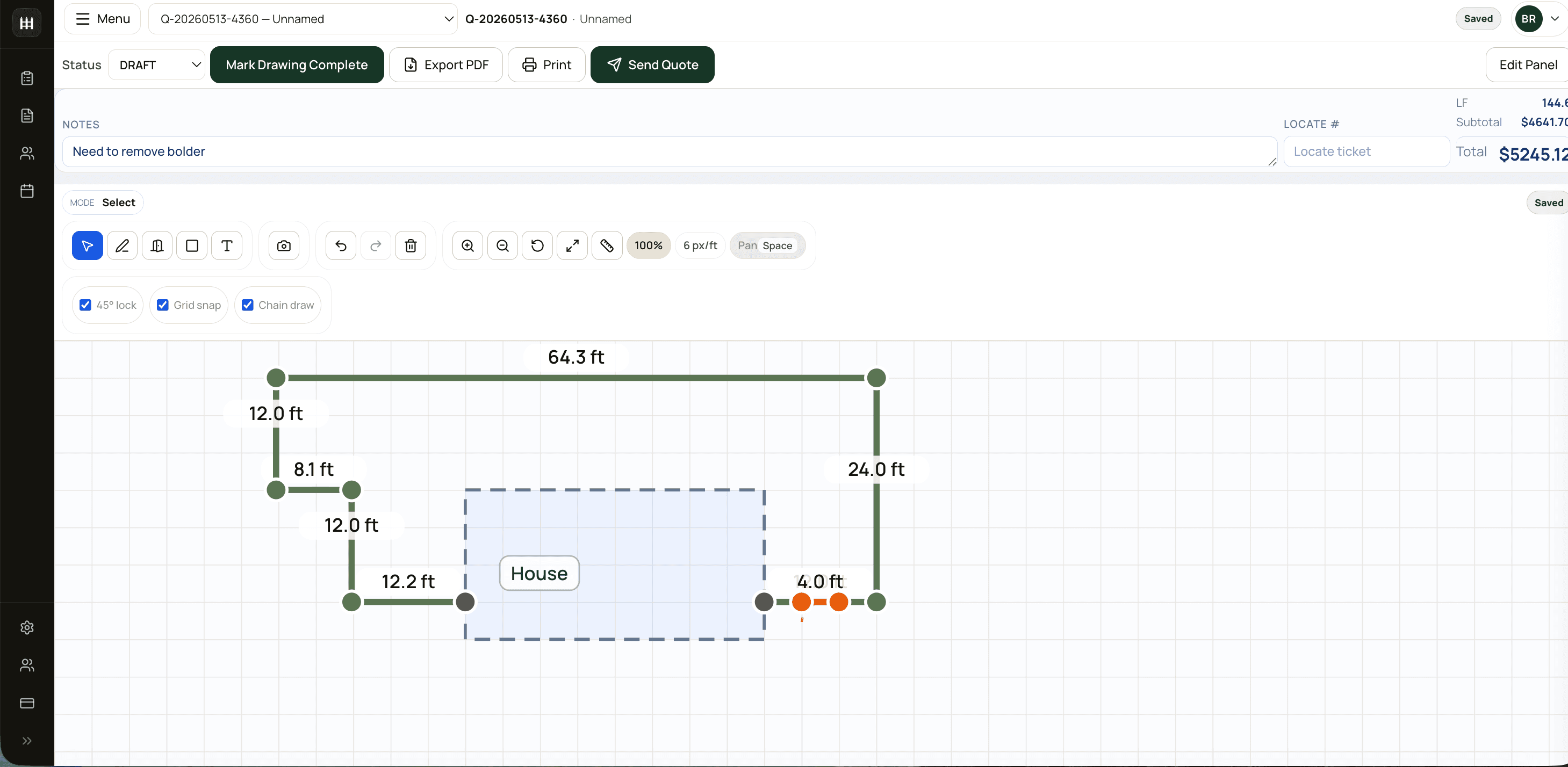
Most contractor estimating software was built for HVAC, plumbing, or remodeling — categories where every job is a unique scope and every quote is built line item by line item. Fence is different. Most fence quotes are linear-foot math against a small set of repeating assemblies (post + rail + fabric + gates), with regional sales tax and a measurement that's either drawn or read off a tape.
That mismatch is why generic contractor software feels heavy when you adapt it to fence, and why a tool built for fence specifically will adopt in days instead of weeks.
This guide walks through what good fence estimating software actually looks like, how to evaluate one in a trial, and how to get ROI out of it after you've signed up. FenceTracer is referenced throughout as a working example — the criteria apply broadly, so use them to evaluate any tool you're considering, including ours.
What fence-specific software does that generic tools don't
Three things separate fence-built software from generic contractor software:
Drawing is the source of truth. When the canvas you draw on IS the takeoff — when snapping a layout produces linear feet, post counts, gate hardware, and a priced quote automatically — every measurement change updates the quote without re-keying. Generic tools treat the drawing as a separate workflow (often via a CAD bolt-on like ArcSite), then expect you to translate it back into line items. That's where errors and time loss live.
Province-aware tax is one field, not a setup project. Canada has eight different sales tax models depending on province (HST in Ontario and Atlantic, GST + QST in Quebec, GST + PST in BC/MB/SK, GST-only in Alberta and territories). Fence-specific software derives the right rate, label, and remittance jurisdiction from a single province field on the company. Generic tools require you to maintain rate tables and pick the right one per quote.
The catalog speaks fence. Posts, rails, fabric, gates, fittings, labour. Each item maps to a slot, and each slot has a known multiplier per linear foot of fence. Generic tools have a generic catalog with no concept of "every chain link run uses 1 line post per 10 LF + 2 end posts + corners." Without slot mapping, you count posts manually on every quote.
What to look for when picking a tool
Don't trial on your easiest job. Trial on your worst — the irregular property line, the mixed fence types in one quote, the locate-call situation, the bilingual paperwork. That's where tools earn their keep or fail visibly.
Specifically, run these eight checks during a trial:
- Drawing-driven takeoff. Snap a 100-LF rectangular run with one gate. Does the quote populate posts, rails, gate hardware automatically? Or does it stay empty until you manually add line items?
- Province-aware tax. Set the company's province. Verify the tax rate, label, and breakdown match what you'd actually print on an invoice (e.g., "HST 13%" vs "GST 5% + QST 9.975%").
- Vendor pricebook import. Import a real Master Halco workbook, including its quirky preamble rows and renamed sheets. Tools that can only ingest a perfectly clean CSV will fall over on every supplier update.
- Per-style rates. Configure shadowbox vs board-on-board vs spaced-picket as different per-LF rates within the same fence type. Most fence shops vary 30%+ between styles; without per-style overrides you're hiding margin variance in the totals.
- PDF quality. Generate the customer-facing PDF and open it in a real reader. Does the layout drawing fit on the first page? Does the line itemization read clearly? Does the company logo look right? Generic tools produce remodeling-style change-order PDFs that don't fit fence.
- Pricing guardrails. Try to send a quote with margin below 20% or with an unmapped catalog slot. Does the software warn before sending, or quietly let you ship a money-loser?
- Multi-user behavior. Have two people edit the same quote at the same time. Real cloud handles concurrent edits; "cloud-enabled" desktop apps create file conflicts within a week.
- Trial terms. Enough time to run real jobs, full features, and no credit card up front. FenceTracer currently offers 30 days; whatever product you evaluate, avoid a trial too short or restricted to test the full workflow.
How fence software should price itself
Per-user subscription pricing is structured for tools where every seat is a paying revenue producer (sales reps in a CRM, agents in a contact center). Fence shops aren't shaped that way. A shop with two estimators, four installers, and an office admin is paying for seven seats — but only the estimators directly drive new revenue. Per-user pricing punishes growth and discourages adding installers as users (which means installers fall back to phone-and-paper for crew comms).
Flat unlimited-user pricing matches the shape of a fence shop. A 3-person team and a 15-person team both pay $180/month. The math:
$180
FenceTracer flat monthly, all users$25–60
Typical per-user/month, generic tools3–6×
Cost difference at 10 usersThe breakeven against per-user pricing is around 4 users. Below that, generic tools are sometimes cheaper; above that, the gap widens fast.
Configuration that actually earns its keep
Once you've picked a tool, the first week is about turning it into a quoting machine for your shop:
- Migrate your supplier pricebook on day one. The tool's value scales with how complete your catalog is. Don't wait.
- Set the company province field. Single field, drives timezone and the right tax math everywhere downstream.
- Configure per-foot rates by fence type. $25–30 chain link, $65–80 wood, $80–100 ornamental as a starting point. Refine after a month of real quotes.
- Set a margin floor. 30–40% on materials, 50–65% on labour. Below the floor, the software warns before send. That one feature is worth the subscription on its own.
- Map slots per fence type. "Every chain link run uses 1 line post per 10 LF + 2 end posts + corners + 1 rail per LF." Set once; quoting becomes near-automatic.
- Upload company logo, address, phone. Goes on every quote PDF and email. Five minutes, big visual win.
- Invite your team early. Estimators, dispatchers, installers — assign roles correctly (don't make everyone admin) and bring them in week one. Shadow spreadsheets form fast when only one person is in the system.
ROI tracking after the trial
The metrics that matter, ranked by leverage:
Time-to-first-quote-sent. Best ROI metric for new software. New estimator should ship a real customer-facing quote in week one. If onboarding takes longer, the tool is too complex or the configuration is wrong.
Quotes per estimator per week. Should at least double compared to spreadsheet quoting. Three to four quotes/day per estimator is a reasonable target with drawing-driven takeoff. If you're not seeing the lift after 30 days, raise it with the vendor.
Win rate by lead source. Tag every quote with how the lead came in (Google Business Profile, referral, web form, walk-in, repeat). Without this tag, marketing spend is a guess. Software that doesn't make the source tag a one-second habit isn't going to give you the data.
Callback rate. Quotes that result in a callback for missed materials are software failures (and quoting failures). Track this trend — fence-specific software with catalog guardrails should drive it down.
Margin trend at company level. Per-job margin is one number; trend across estimators and fence types is the management view. Both matter; both should be a single report, not a spreadsheet export.
The Canadian-specific stuff that matters
Generic fence software, even when it's well-built, often misses Canadian context:
- Bilingual quote PDFs in Quebec. Bill 96 strengthened French-language requirements for consumer documents. Tools without a French rendering path leave Quebec contractors retrofitting in Word.
- Locate-call status as a workflow field. Ontario One Call, Info-Excavation in Quebec, BC One Call — every install requires it. Software where locate status is a first-class field that blocks scheduling until cleared is the right pattern.
- WSIB / WCB clearance per province. The clearance certificate workflow is province-specific. Software that integrates with the right provincial portals saves real admin time.
- HST/QST/PST math correct, not approximated. "We support Canadian tax" is a vendor claim, not a feature. Run a Quebec quote and a BC quote and verify the lines and rates render the way Revenu Québec and Finance BC expect.
Common evaluation mistakes
Mistake: judging on demo, not on real quotes. A demo is the vendor's curated path. Your job is the unfiltered path. Insist on full-feature trial access and run a week of your real quotes through it.
Mistake: per-seat pricing math without crew users. "Three estimators × $40 = $120, that's cheaper than $180." True, until you add the four installers as VIEWERs and the office admin. Math at full crew size, not at office-only size.
Mistake: skipping the email send test. Generate a real PDF and email it to your own address from the tool. Verify From address, deliverability, attachment quality. Catch SPF/DKIM issues before you send to a real customer.
Mistake: ignoring vendor support response time. Email a non-urgent question during the trial. Time the response. Days mean you're alone in the busy season; same-day during business hours is the floor.
Mistake: not migrating the pricebook day one. The tool's value compounds with catalog depth. Postponing the import keeps the tool in "demo mode" until you commit to it.
FenceTracer
Try FenceTracer free for 30 days
Built for Canadian fence contractors. Drawing-driven takeoffs, province-aware tax, $180/month flat for unlimited users. No credit card required.FAQ
Frequently asked questions
How is fence-specific software different from a generic contractor tool like JobNimbus or ServiceTitan?
Fence-specific software ships with the right defaults — fence types, post slots, gate hardware, Canadian tax math, vendor pricebook formats. Generic tools require configuration before they can quote a fence accurately. Adoption is days vs weeks. Per-user pricing on generic tools also penalizes growth: a 10-person fence shop typically pays 3–6× more for a generic per-user tool than a flat-rate fence-specific one.
Does FenceTracer work in every Canadian province?
Yes. Set the company's province at signup and the right tax model applies automatically — HST 13% in Ontario, 15% in NB/NL/PEI, 14% in Nova Scotia, GST 5% + QST 9.975% in Quebec, GST 5% + PST/RST in BC/Manitoba/Saskatchewan, and GST 5% only in Alberta and the territories. Quote totals, line labels, and PDF tax breakdowns derive from that single field.
Can I import my existing supplier pricebook?
Yes. FenceTracer's catalog import handles real-world supplier files including Master Halco workbooks (with their preamble rows, renamed sheets, and shifting column layouts) and standard CSV. SKUs map to slots — POST, RAIL, FABRIC, GATE, FITTING, LABOR, MISC — so the quote engine knows how many of each go on a given run.
How long does setup take?
Most shops are quoting on the same day. The province field, simple per-foot rates, and a starter catalog get you to a first quote inside an hour. Importing your full vendor pricebook and tuning per-style rates is another half-day. Compare to 1–2 weeks for typical generic-software onboarding.
Does FenceTracer have a mobile app?
FenceTracer is a responsive web app — works on phone and tablet browsers without a native install. For 2–10 person fence shops, that covers realistic mobile usage (estimators sending follow-ups, crews checking the day's schedule). Larger shops with offline-only field requirements should evaluate carefully.
What happens to my quotes if I cancel?
Quotes, customers, and the pricebook can be exported to CSV at any time, including after cancellation. There's no lock-in tax — your data is yours. We'd rather you stay because the product earns it than because you couldn't leave.
Is there a free trial?
Thirty days, full features, no credit card required. We don't gate trial features or charge up front. The trial is long enough to run real quotes through the tool — that's the only honest evaluation.
Keep reading — focused landing pages
This guide is the framework. Each of these pages drills into a specific facet:
- Fence estimating software — the core drawing-first workflow, end-to-end
- Fence quote software — proposal automation: from sketch to branded, tax-correct PDF
- Fence contractor software — the full operations stack beyond estimating
- Chain link fence estimator — chain-link-specific takeoff logic and catalogue
- Wood fence estimator — wood / cedar / PT / composite estimating
And the comparison pages, if you're evaluating against a specific competitor: