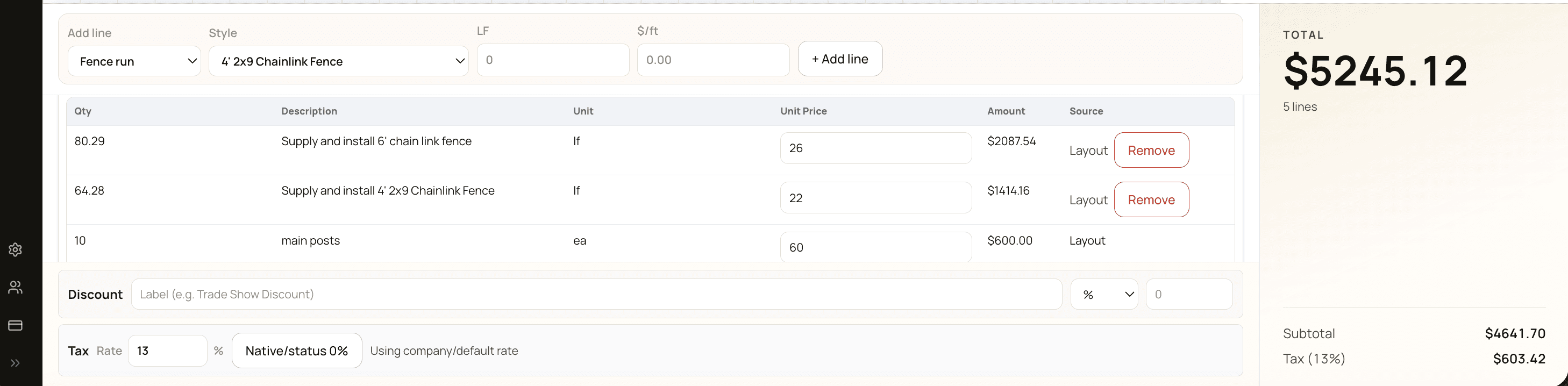
A fence quote isn't just a price — it's a sales document, a scope agreement, and a math worksheet rolled together. Done well, it tells the customer exactly what they're getting, what they owe, and when, in 30 seconds of reading. Done poorly, it leaves the customer guessing, the crew improvising, and the owner explaining.
This guide covers what a quote should contain, how to compress turnaround time to 48 hours, and the follow-up cadence that converts the half of quotes that don't close on first send.
References to FenceTracer reflect a working implementation. The patterns apply broadly.
What every quote must contain
Strip the fluff and a fence quote needs about fifteen things. Anything more is noise; anything less leaves a customer (or your crew) guessing.
Customer identity
- Customer name (billing) and site address (where work happens) — not always the same. Both matter because tax follows the install address and the locate call goes to the install address.
- Quote number and date. Sequential format like
Q-2026-0142. Unambiguous reference for everyone.
Scope
- Itemized scope. Fence type, height, total LF, gate count and width, fence style. "Install 100 LF of 6-ft pressure-treated privacy fence with 1× 4-ft single gate" beats "fence install."
- Layout drawing on the PDF. When you've drawn the layout, embed it on the quote. The picture clears up which side of the property line, which corner has the gate, and where the run starts and ends.
- Line items grouped by run. Posts, rails, fabric, gate hardware, labour. Customers don't need every SKU broken out, but they do need to see the major components so they can compare across contractors.
- Included and excluded items. Spell out: post-hole disposal, debris removal, customer-side gate hardware, gate latch height. Excluded items (existing fence demolition, sod repair, locate fees if applicable) get their own line as "not included."
Money
- Subtotal, tax line, total. Three lines at the bottom. The labels matter — "HST 13%" beats "Tax" for any customer with their own books.
- Discount line, before tax. If you're offering a cash, repeat-customer, or multi-job discount, show it as a separate line above the tax line. CRA expects this order.
- Deposit terms. 30–50% at signature is standard. State the dollar amount and when it's due.
- Payment terms. Net-15 or net-30 from invoice date, plus accepted methods (etransfer, cheque, credit card).
Timeline and trust
- Quote validity period. "Quote valid for 30 days." Material prices move; you need a window.
- Estimated install timeline. "Subject to scheduling and weather, install in approximately 2–3 weeks from deposit." Customers tolerate ranges; surprises wreck trust.
- Warranty terms. Most fence shops offer 1-year workmanship warranty plus manufacturer warranties on materials. State it explicitly so customers don't assume.
- Your contact info, big. Phone, email, company name on the quote PDF. Customers come back to the document weeks later wanting to ask one question.
- GST/HST registration number. Required on every taxable invoice; put it on quotes too. Signals you're a legitimate registered business.
Speed: get the quote out in 48 hours
Quotes that arrive in 48 hours close at roughly twice the rate of quotes that arrive a week later. The bottleneck is almost always back-office speed, not lead quality.
The compression levers:
Drawing-driven takeoff
When the layout drawing IS the takeoff — when snapping a run produces posts, rails, gate hardware, and pricing automatically — every measurement change updates the quote without re-keying. Manual line-item entry is where time and errors live.
Per-foot rate as a starting point
A per-LF rate per fence type ($25–30 chain link, $65–80 wood, $80–100 ornamental) gives you an immediate phone-quote number. Refine with the catalog when the job is real and you've seen the site.
Reusable templates for common job shapes
Two-thirds of fence quotes resemble a job you've already done. Save common shapes as templates: "4-ft chain link 100 LF + 1 gate," "6-ft pressure-treated privacy 80 LF." New quotes start from the template, modify the LF and address, change the gate count — done.
Customer record auto-populates
Picking the customer in the quote tool fills name, email, phone, and prior site address. Re-typing is where typos and bounce-emails enter.
Photo-backed site quotes
A sketch over a photo from the site visit makes the quote concrete. Drop the photo behind the canvas, snap measurements over it, and you're back at the office with the quote 80% built. The site visit pays for itself in conversion and in reduced callbacks.
Pricing guardrails before send
The estimator shouldn't have to remember to check margin. The software should warn before send if margin is below floor, slot mapping has gaps, or the total looks like an outlier. Catching it before the customer sees it is the whole point.
One-click PDF, one-click email
Generating the customer-facing PDF should be one button. If it requires picking a template, choosing fields to include, and configuring colors, you'll skip it. Same for email send: the estimator should be able to send the quote PDF directly from the tool with the company's name in the From line and a branded footer.
48hr
Target time-to-quote2×
Closing rate vs week-late<10min
Per-quote admin time, dialed inFollow-up cadence that converts
About half of quotes don't close on first send. The cadence that recovers a meaningful share:
Day 0: send and log
Send the quote, log the send time, recipient address, and quote total in the customer record. The send timestamp is your starting point for follow-up timing.
Day 3: short follow-up email
"Wanted to make sure the quote arrived OK and answer any questions." No pressure. Signals you're paying attention without being pushy.
Day 7: text
A week after send, a text. About 30% of "lost" quotes close on the day-7 text alone. Texts get read in minutes; emails get triaged in days.
Day 14: phone call
Two weeks after send, a quick call to ask if they're still planning the project. Direct conversation reveals what email never will. Often the customer has a question they didn't think was worth emailing about.
After day 14: give it space
Three touches in two weeks is welcome; six is harassment. The customer who needs five emails to remember you isn't going to be a great customer.
Re-engagement at 90 days
Quotes that went cold are not always dead. A short note 90 days later — "Just checking in, prices have moved a bit, would you like an updated quote?" — recovers some.
Status tracking and quote revisions
Every quote should move through statuses: Sent → Viewed → Accepted (or Lost / Expired). Each transition is a data point that aggregates into win-rate analysis later.
When a customer wants changes ("what if it's pressure-treated instead?"), revise the existing quote and bump the revision number. Don't issue Q-2026-0142 and Q-2026-0143 for the same job — it confuses the customer and your accounting. Software with revision support keeps the audit trail clean.
Quotes that pass their validity date should auto-flag as expired. An estimator who reactivates an expired quote knows to verify pricing before sending — material prices move, and a stale quote at old prices is a margin loss waiting to happen.
Closing: from acceptance to scheduling
The handoff from sales to operations is where good fence shops stay good.
Acceptance signature or reply
Either a digital signature flow or a clear "reply to confirm" instruction. Acceptance creates a paper trail that protects both sides.
Deposit invoice immediately on acceptance
Send the deposit invoice the moment the customer accepts. Half-day delays are how good intent becomes "I'll get to it" and stalls. Strike while the customer is committed.
Acceptance triggers scheduling
Customer accepts → the job moves into your scheduling queue automatically. Manual hand-off between sales and ops is where jobs get lost. Software that flips the status from Sold to Scheduled in one workflow saves a real point of failure.
Win-rate analytics
Once you have ~50 quotes through a system with disciplined source tagging and closed-lost reasons, useful patterns emerge:
- Win rate by lead source. GBP referrals at 70%, web form at 25%, walk-ins at 50%. Different sources need different sales processes.
- Win rate by estimator. Some estimators close at 70%, some at 30%. Coaching opportunity, not a tooling problem.
- Win rate by price band. Quotes between $5K–$10K may close at 60%; quotes over $15K at 25%. If the gap is sharp, it's a sales-process issue more than a pricing issue.
- Average days from send to acceptance. Should trend down as your follow-up cadence dials in.
These reports turn quoting from an art into a process you can actually improve. They require a source tag and a closed-lost reason on every quote — make both one-second habits at quote creation and at quote close.
FenceTracer
Quotes that ship in 48 hours and close at twice the rate
FenceTracer compresses quoting with drawing-driven takeoff, per-foot rates, branded PDFs, and a Day 0/3/7/14 follow-up workflow. 30-day free trial, no credit card.FAQ
Frequently asked questions
How do I write a fence proposal that closes?
Lead with the layout drawing on page one. Itemize scope (fence type, height, LF, gates, style). Show subtotal / tax / total clearly. State deposit, validity period, install timeline, warranty, and your contact info. Spell out what's included and what's excluded. Keep it to one page if possible. The fastest way to lose a fence quote is to bury the relevant numbers in three pages of boilerplate.
What's the right deposit for a fence quote?
30–50% at signature is standard for residential fence work. State the dollar amount and when it's due on every quote. Customers who push back hard on a 30–50% deposit are usually shopping the cheapest contractor — that's not a customer worth winning. Commercial customers may negotiate to lower deposits with progress billing; price the additional cash-flow risk into the bid.
How fast should I send a fence quote?
Within 48 hours of the inquiry. Quotes that arrive in 48 hours close at roughly twice the rate of quotes that arrive a week later. The bottleneck is back-office speed, not lead quality. Drawing-driven takeoff, reusable templates, customer record auto-populate, and one-click PDF generation are how you compress this — manual line-item entry is where the days disappear.
Should I use a fence quote template?
Yes. Most fence quotes resemble a job you've already done — common shapes like '4-ft chain link 100 LF + 1 gate' or '6-ft pressure-treated privacy 80 LF.' Save these as templates so new quotes start from a known good shape rather than a blank canvas. Modify the LF, address, and gate count, send. Two-thirds of your quotes can ship faster this way.
What's the right follow-up sequence for fence quotes?
Day 0: send and log. Day 3: short follow-up email. Day 7: text. Day 14: phone call. After that, give it space. About 30% of 'lost' quotes close on the day-7 text alone — texts get read in minutes; emails get triaged in days. Three touches in two weeks is welcome; six is harassment.
How do I handle quote revisions when a customer changes their mind?
Revise the existing quote and bump the revision number — don't issue separate quote numbers for the same job. Software with quote-revision support keeps the audit trail clean and the customer-facing reference consistent. When a customer asks 'what if it's wood instead of vinyl,' you should be able to swap fence type and re-quote in seconds, not by manually editing a dozen line items.
What's a fence proposal generator and do I need one?
A fence proposal generator turns a layout drawing or a few job inputs into a customer-ready PDF quote. The good ones (FenceTracer included) auto-populate posts/rails/gate hardware from the drawing, apply your per-LF rates and Canadian sales tax, and produce a one-page branded PDF in one click. The alternative is building the proposal manually in Word or Excel each time — workable for 1–2 quotes a week, painful past that.