FenceTracer saves money in a very specific way: it reduces the cost of getting from "customer asked for a fence quote" to "customer has a clean, accurate, ready-to-approve proposal."
That sounds narrow until you count what quoting actually costs a fence company. Then it gets wider.
A quote is not just a PDF. It is measurement, layout, material takeoff, product selection, price lookup, tax, markup, customer cleanup, revisions, follow-up, scheduling, crew assignment, material prep, and a handoff to the crew if the job sells. When that workflow lives in paper notes, spreadsheets, copied PDFs, whiteboards, texts, and memory, the software bill looks cheap but the operational cost is high.
FenceTracer is built to remove that hidden cost.
It does not save money by magically making materials cheaper. It does not replace good estimating judgment. It does not promise every job will close. It saves money by making the estimating and operations workflow faster, harder to break, easier to repeat, and easier to hand off.
For a fence contractor, that is where the real dollars are.
The short version
FenceTracer saves money in ten main places:
- Less morning confusion. Crews see the day's jobs on their phones, in order, with who they are working with and what is next.
- Faster material prep. The crew can start setting up materials before the owner has to explain the agenda again.
- Less time per quote. Draw the layout, pick the fence style, calculate line items, and send the proposal without rebuilding the job in a spreadsheet.
- Fewer pricing mistakes. Catalogue-driven pricing reduces stale price lists, missing posts, forgotten gates, and copied line items from old quotes.
- Cleaner material takeoffs. Drawing-driven measurements make quantities easier to audit before you buy material or schedule labour.
- Time-off-aware scheduling. Crew time off and vacation blocks become part of the scheduling workflow instead of a separate thing the owner has to remember.
- More people can help. Quotes and material organization stop depending on one person who knows the paper system.
- More quotes sent on time. Faster quote turnaround gives hot leads less time to choose another contractor.
- Less duplicated admin. The same job data can support the quote, pipeline, customer record, PDF, schedule, worker app, and crew handoff.
- Lower software overhead. At $180 CAD/month flat, FenceTracer can be cheaper than per-user or enterprise contractor tools.
The exact savings depend on your shop. A solo operator doing three quotes a month will not see the same return as a five-person shop sending 20 quotes a month. But the payback equation is simple.
You save money when:
time saved + crew downtime avoided + errors avoided + current software replaced
> $180 CAD/month
Everything else is detail.
What paper-to-digital savings looks like in real life
The most useful FenceTracer feedback from a paper-based shop was not "the software has more features." It was operational:
- Before FenceTracer, the crew would spend part of the morning standing around trying to figure out what was on the agenda.
- After FenceTracer, the owner could go to the office and the crew would already be setting up materials for the day because they had the schedule on their phones.
- Workers could see what to do next, who they were working with, and the order of the day without waiting for the owner to repeat it.
- Time-off requests became easier for the crew to manage, and approved time off could be considered while scheduling.
- More people on the team could help put quotes together or organize materials for a job.
- The owner got more time back, less frustration, and a smoother operation.
That is the part that pure ROI calculators miss. FenceTracer is not only saving minutes inside the quote builder. It is removing the small daily frictions that make a fence company feel harder to run than it should.
Run the numbers first
The fastest way to make this honest is to use your own quote volume.
ROI calculator
Your savings with FenceTracerAll figures in CAD. Numbers update as you type, adjust to match your shop.If you are quoting in spreadsheets today, set current software cost to $0 and focus on time saved. If you are already paying for JobNimbus, ArcSite, Buildertrend, ServiceTitan, FenceCloud, or another system, include that monthly bill too.
The calculator is intentionally conservative. It counts software savings and quoting-time savings. It does not count every possible upside, because inflated ROI math is useless. It also does not fully count the operational wins above: fewer morning interruptions, fewer crew questions, better material readiness, and less owner frustration. If the conservative version already clears the monthly price, everything else is bonus.
1. FenceTracer cuts the cost of quote labor
Most fence companies underestimate how much quoting time costs.
If an estimator spends 45 minutes on a quote and sends 20 quotes per month, that is 15 hours a month. At a $50/hour loaded cost, the shop is spending about $750/month on quote prep before counting revisions, follow-ups, or customer calls.
That labour cost is easy to ignore because it does not arrive as an invoice. It shows up as late nights, slow follow-up, customers waiting, owners stuck doing office work, and estimators who cannot get to the next site visit.
FenceTracer attacks the quote-prep loop directly:
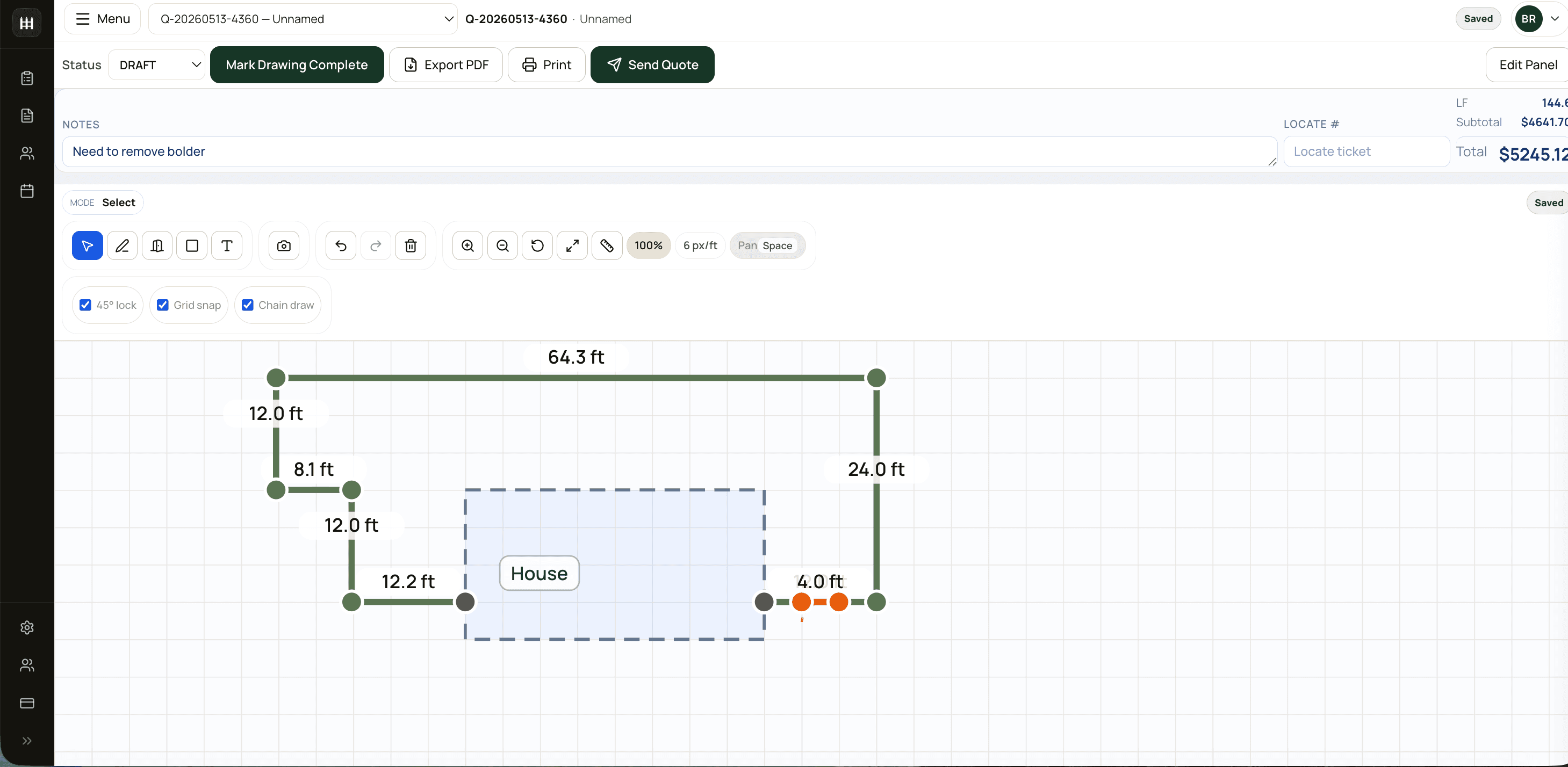
- draw the fence layout,
- set the scale,
- choose the fence style,
- price from the catalogue,
- adjust line items when needed,
- apply tax,
- export or send the quote.
That means the same work happens once. The drawing feeds the quantities. The quantities feed the quote. The quote feeds the pipeline.
For a shop doing 20 quotes per month, even saving 25 minutes per quote is meaningful:
20 quotes x 25 minutes saved = 500 minutes
500 minutes / 60 = 8.3 hours
8.3 hours x $50/hour = $415/month
That one line of savings is already more than twice the $180 CAD/month software cost.
2. FenceTracer reduces underquoting and missed line items
The most painful estimating mistakes are not the ones customers reject. They are the ones customers accept because the price was too low.
Common fence quote misses look small during estimating:
- terminal posts not counted correctly,
- gate hardware left off,
- top rail quantity rounded wrong,
- old fabric price copied from a previous quote,
- labour markup applied to one section but not another,
- freight or handling missed on a smaller material order,
- tax rate changed manually and never changed back.
One missed line item can wipe out the savings from a month of cheap software.
FenceTracer helps by keeping the job in a structured workflow. A fence run is not just typed into a cell; it is part of a drawing, a style, a quantity, and a priced line item. A gate is not just a note; it can become part of the quote. Catalogue pricing is centralized instead of scattered across old workbooks.
That does not eliminate estimating judgment. You still decide what belongs in the job. But it reduces the number of places where a quote can quietly drift away from reality.
3. FenceTracer makes takeoffs easier to audit
Material waste is expensive in both directions.
Buy too little and the crew loses time waiting on another run to the supplier. Buy too much and cash sits in extra posts, rails, fabric, panels, concrete, and hardware that may or may not fit the next job.
Manual takeoffs create waste because the quantities are hard to verify after the fact. The estimator has notes. The spreadsheet has numbers. The drawing may be a photo or sketch. The crew sees the job days later and has to trust that everything lines up.
FenceTracer keeps the layout closer to the quote. When measurements, runs, gates, and line items live in the same workflow, it is easier to answer basic questions:
- How many linear feet are we actually quoting?
- Which sections are which style?
- Where are the gates?
- What changed between the first draft and the final quote?
- Does the material list still match the drawing?
That auditability saves money because it catches problems before they hit the yard, the supplier, or the install day.
For a deeper look at this workflow, read the fence takeoff software guide.
4. FenceTracer keeps catalogue pricing from going stale
Fence pricing moves. Material costs move. Supplier sheets change. Labour rates change. Freight and handling policies change. The risk is not just that prices change; it is that one estimator updates their spreadsheet and another estimator keeps quoting from the old one.
That is how two quotes from the same company can end up using two different versions of reality.
FenceTracer is built around shared catalogue and pricing data. The Toronto 2025 Fencing Catalogue baseline gives shops a starting structure, and your own pricing can be maintained in one place instead of hidden across copied spreadsheets.
That saves money in three ways:
- Less underpricing. Stale material costs stop leaking margin.
- Less rework. Estimators do not have to rebuild line items from scratch.
- More consistent quotes. Two people quoting the same style use the same underlying pricing logic.
Consistency matters. A growing fence shop cannot have every estimator running their own private calculator.
If catalogue depth is the main concern, the catalog and pricing guide covers the pricing workflow in more detail.
5. FenceTracer helps you send more quotes while leads are still hot
Every fence contractor knows the customer who disappears because the quote took too long.
They called three companies. One sent a quote the same day. One sent it two days later. One sent it next week. The winner is not always the cheapest. Often, it is the one who looked organized and responded while the customer still cared.
Slow quoting costs money because the lost job never appears on a profit-and-loss report. It just vanishes.
FenceTracer saves money here by reducing the friction between measurement and proposal. If the estimator can turn a layout into a quote faster, more quotes go out before the lead cools off.
That does not mean speed should replace accuracy. The point is the opposite: make the accurate quote faster.
For a shop averaging $4,000 per residential job, one extra accepted job per quarter is meaningful. Even if the net profit on that job is modest, it can cover months of software. And that upside is not included in the ROI calculator above.
6. FenceTracer makes quoting and material prep a team skill
Paper systems often create one-person bottlenecks.
One person knows which quote template is current. One person knows where the material notes are. One person knows how to turn a sketch into a priced quote. One person knows which job needs what loaded in the truck.
That person is usually the owner, the senior estimator, or the office lead. When they are available, the system works. When they are busy, on site, sick, or trying to get an uninterrupted morning, the whole shop slows down.
FenceTracer saves money by making the workflow easier for more people on the team to help with:
- a quote can start from the drawing instead of from memory,
- material quantities are easier to organize from the job record,
- line items live in a shared structure instead of someone's copied sheet,
- the job can move from quote to schedule without being rewritten,
- and crew-facing information follows the job instead of being re-explained.
That is a productivity gain across the shop, not just for the estimator. When more people can put a quote together, check a material list, or understand what a job needs, the owner is no longer the only person who can keep the operation moving.
7. FenceTracer reduces duplicate data entry
Duplicate admin is one of the quietest costs in a fence company.
The same customer gets entered in a spreadsheet, then a PDF, then a calendar, then a job board, then a worker note, then a follow-up list. Every re-entry is a chance to lose context, miss a detail, or make the owner answer the same question twice.
FenceTracer keeps the quote closer to the rest of the job:
- customer,
- drawing,
- line items,
- total,
- status,
- pipeline,
- next visit,
- schedule,
- crew assignment,
- materials,
- crew handoff.
That means less copy/paste and fewer "which file is final?" conversations.
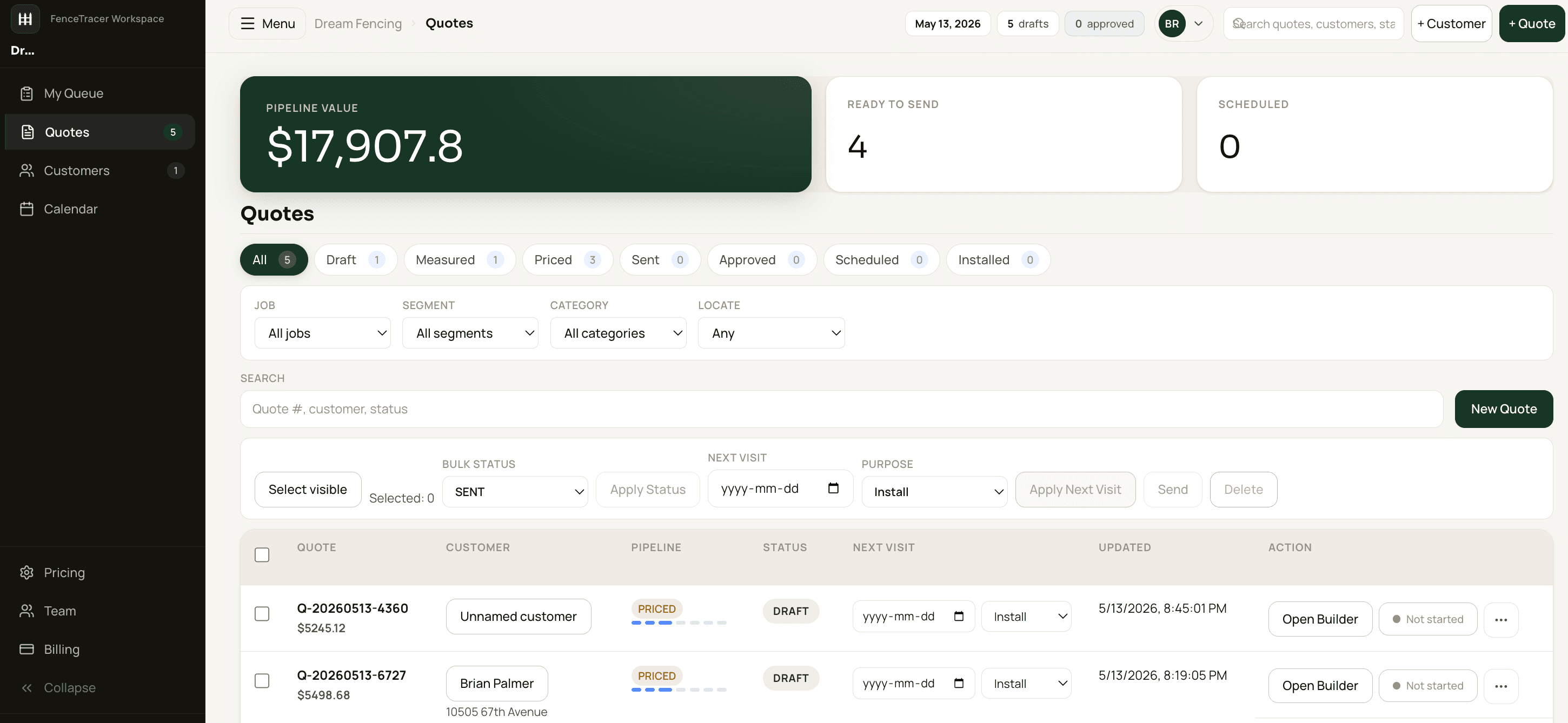
The money impact is not only office time. It is fewer missed follow-ups, fewer stale drafts, fewer forgotten approvals, fewer material-prep questions, and fewer jobs that get sold but are not ready for operations.
8. FenceTracer can replace more expensive software
If you are on spreadsheets, FenceTracer has to pay for itself through time savings, fewer mistakes, and better turnaround.
If you are already paying for contractor software, the math can be easier.
FenceTracer is $180 CAD/month flat. Many general contractor tools are priced per user, by tier, or as larger field-service platforms. For a fence shop that mostly needs measuring, quoting, pricing, pipeline, and crew handoff, paying for a broad construction suite can be overkill.
| Feature | FenceTracer | Common current setup |
|---|---|---|
| Spreadsheet / paper | Saves through time, accuracy, and pipeline control | $0 software but high labour cost |
| Per-user contractor CRM | $180 CAD/month flat | Cost rises as team grows |
| Enterprise field-service suite | Fence-first quoting and takeoff | More modules than many fence shops need |
| CAD-only drawing app | Drawing plus quote, tax, and pipeline | Strong drawing, weaker fence operations |
| Generic quote PDF tool | Measured layout drives priced line items | Proposal output without fence takeoff logic |
For the detailed switch math, read switching from big-name fence software. For spreadsheets specifically, read spreadsheet vs FenceTracer.
9. FenceTracer makes tax handling less fragile
Tax mistakes are not glamorous, but they are expensive.
Canadian fence contractors deal with HST, GST, QST, exemptions, and province-specific quoting expectations. If tax is manually typed into each spreadsheet quote, the process depends on memory.
FenceTracer reduces that manual burden by treating tax as part of the quote workflow instead of a final calculator cell.
That matters when:
- a customer is in a different province,
- a tax-exempt scenario applies,
- a copied quote keeps the wrong rate,
- a discount changes the taxable base,
- or an estimator forgets to update a template.
Good software does not make tax strategy decisions for you. It simply makes the standard calculation easier to apply consistently.
For Canadian-specific details, see the HST/QST fence contractor guide.
10. FenceTracer keeps scheduling realistic when people are off
Crew scheduling gets expensive when it depends on memory.
If time-off requests live in texts, paper notes, or a conversation from last week, the owner has to mentally check availability every time a job gets scheduled. That is a fragile system. It works until the shop is busy, the schedule changes, or two people assume someone else remembered.
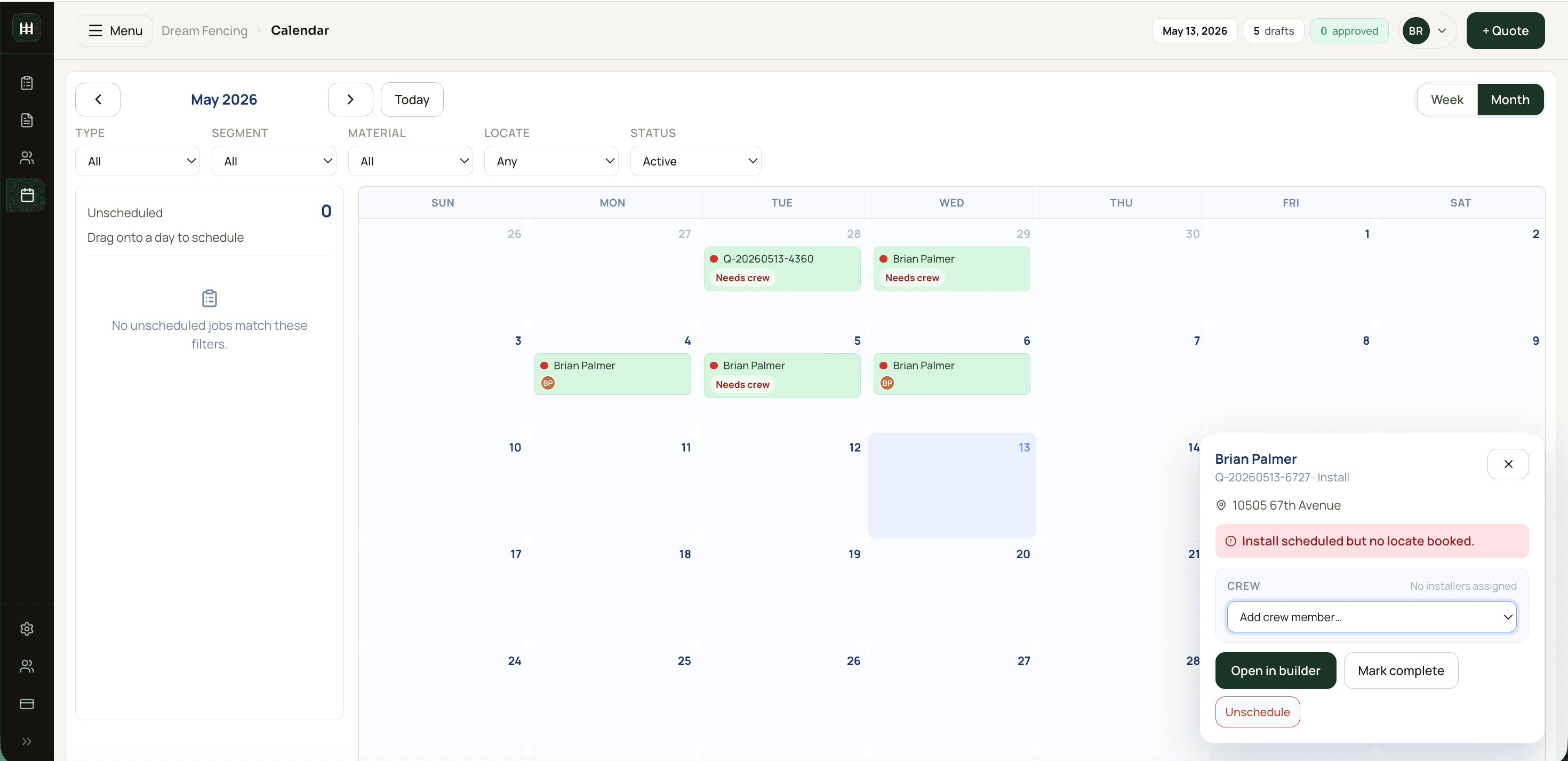
FenceTracer makes time off part of the operational workflow:
- the crew can manage time-off requests,
- approved time off can show up while scheduling,
- scheduling can account for who is actually available,
- and the calendar becomes a shared source of truth instead of a private puzzle.
That saves money because schedule mistakes are expensive. A job assigned to someone who is off creates rework, phone calls, customer delays, and crew shuffling. Even when it gets fixed before the install, it costs attention.
11. FenceTracer protects the handoff from sales to install
A sold quote is not done. It becomes a job.
If the quote was built in a spreadsheet and the install notes live in somebody's memory, the crew starts with incomplete context. That creates expensive day-of-install friction:
- wrong material loaded,
- crew unsure what comes first,
- workers asking who they are paired with,
- workers waiting for the owner to explain the day,
- unclear locate status,
- customer expectations missed,
- quote revisions not reflected in the crew plan,
- installer asks the office for details that should have been attached already.
FenceTracer connects quoting, project status, schedule order, crew assignment, and worker-facing job visibility. That does not turn a messy operation into a perfect one overnight, but it reduces the gap between the estimate and the work order.
Cleaner handoffs save money because field time is expensive. A crew waiting, calling, reloading, or revisiting a site costs more than office software. A crew that already knows the day's order and can start staging materials is a different kind of shop.
12. FenceTracer gives owners time back and better control
The owner-level value is simple: know what is drafted, priced, sent, approved, scheduled, assigned, and installed.
Without that view, money leaks through neglect:
- quotes sitting unsent,
- accepted jobs not scheduled,
- crews waiting for the agenda,
- follow-ups missed,
- stale estimates forgotten,
- time-off conflicts missed,
- material prep delayed,
- pipeline value unknown,
- busy weeks confused with profitable weeks.
FenceTracer's pipeline view helps a shop see where money is stuck. That can be just as valuable as making a quote faster.
A quote that is 90% finished and never sent is worth $0. A quote that was sent and never followed up may also be worth $0. Pipeline visibility turns those loose ends into work the team can act on.
The less obvious owner benefit is quality of life. When the team can see the schedule, check the order of jobs, request time off, help with quote prep, and organize materials without everything routing through one person, the owner gets fewer interruptions and more control over the day.
That is not soft value. Owner frustration has a cost. So does being the person who has to remember every job, every crew member, every material list, every time-off request, and every customer follow-up. FenceTracer saves money partly by giving that mental load somewhere better to live.
The 30-day test: how to prove the savings
The best way to know whether FenceTracer saves your shop money is not to debate software features. Run a side-by-side month.
Week 1: Baseline your current workflow
For five real quotes and five scheduled jobs, track:
- time from measurement to quote sent,
- time spent editing the quote,
- number of revisions,
- line items manually changed,
- whether tax had to be checked manually,
- whether material quantities were reviewed twice,
- how long the crew waits for the day's agenda,
- how many questions the owner answers before the crew can start,
- whether time-off conflicts have to be checked manually.
Do not estimate. Use a timer.
Week 2: Build the same quotes in FenceTracer
Use the same jobs or the next batch of similar jobs. Track the same numbers. Also ask the crew whether the phone view gives them enough information to start the day without waiting for the owner.
The first few will be slower because you are learning the tool. That is normal. By the end of the week, the workflow should feel more repeatable.
Week 3: Watch for error reduction
Look for fewer manual adjustments:
- fewer copied lines,
- fewer missing items,
- fewer tax edits,
- fewer quote formatting fixes,
- fewer "where did this number come from?" moments.
This is where FenceTracer starts protecting margin.
Week 4: Compare sent quotes and follow-up
Ask the questions that matter:
- Did more quotes leave the shop while the leads were still warm?
- Did the crew know what was on the agenda without standing around?
- Did material prep start earlier?
- Did scheduling account for approved time off without extra owner memory?
- Did the owner get fewer "what are we doing today?" interruptions?
If yes, the savings are not just labour savings. The workflow is helping revenue move faster and making operations smoother.
When FenceTracer may not save you money
A thorough answer has to include the cases where the math is weak.
FenceTracer may not pay for itself if:
- you quote fewer than five jobs a month,
- you are a side-hustle shop with no real admin pressure,
- your current spreadsheet is fast, accurate, current, and used by one person only,
- you need a broad field-service suite more than fence-specific estimating,
- your crew will not use phones for schedule visibility,
- or your team will not actually use the tool after setup.
Software only saves money when it replaces real friction. If there is no friction, or if the team refuses to change the workflow, the ROI drops.
That is why the 30-day trial matters. It lets you test the savings on real jobs before committing.
FenceTracer
Run the savings test on your next month of quotes
FenceTracer is $180 CAD/month with a 30-day trial and no credit card. Quote real jobs, schedule real crews, track the time, and see whether the payback math holds for your shop.FAQ
Frequently asked questions
How exactly does FenceTracer save money?
FenceTracer saves money by reducing quote prep time, preventing pricing and takeoff mistakes, keeping catalogue pricing centralized, applying tax more consistently, improving quote turnaround, reducing duplicate admin, giving crews phone-based schedule visibility, and making handoffs cleaner from estimating to install.
What is the fastest way FenceTracer pays for itself?
For spreadsheet users, the fastest payback is usually time saved per quote. For shops already paying for contractor software, payback can also come from replacing a more expensive per-user or enterprise tool. The ROI calculator on this page lets you test both.
Does FenceTracer guarantee I will win more jobs?
No. FenceTracer cannot guarantee close rate. What it can do is make accurate quotes faster to produce and easier to follow up, which gives hot leads less time to go cold or choose a faster competitor.
Will FenceTracer make materials cheaper?
No. It does not negotiate supplier pricing. The savings come from cleaner quantities, fewer missed items, fewer stale prices, and less wasted estimator and crew time.
How does FenceTracer help crews compared with paper schedules?
Crews can see assigned jobs, the day's order, who they are working with, schedule details, job context, drawings, and material information from their phones. That reduces the morning scramble where workers stand around waiting for the owner or office to explain the agenda.
Does FenceTracer handle crew time off?
Yes. Crew time-off requests can be managed digitally, and approved time off can be considered while scheduling so availability is not trapped in texts, paper notes, or the owner's memory.
Is FenceTracer worth it for a solo fence contractor?
It depends on quote volume. A solo contractor doing fewer than five quotes a month may not clear the $180 CAD/month price. A solo operator doing 10 or more quotes a month usually has enough quoting time and error risk for the math to make sense.
What should I measure during the trial?
Measure time per quote, number of manual edits, number of revisions, quote turnaround time, whether tax and material quantities needed manual checking, how many quotes were sent within 24 hours, how long the crew waits for the daily agenda, how often the owner has to explain the schedule, and whether material prep starts earlier.