Best Fence Estimating Software in 2026 for US and Canadian Contractors
If you build fence quotes from a tape measure, a paper sketch, and a spreadsheet, you already know the cost — re-keying measurements, missed gates, inconsistent prices between estimators, and quotes that take an hour when they should take 60 seconds. The right fence estimating software collapses that loop. The wrong one is generic contractor software adapted from roofing or remodeling that makes you build the fence logic yourself.
Editorial disclosure: FenceTracer publishes this comparison and ranks FenceTracer first. That is an unavoidable commercial conflict, so we separate verified public facts from our opinion, link the vendor sources used, state where another product is stronger, and flag anything we could not confirm publicly.
TL;DR — the ranking
- FenceTracer — drawing-driven takeoff, USD/CAD quoting, US sales tax plus Canadian tax defaults, $59–$180 CAD/mo by plan. Best fit for US and Canadian fence contractors who quote from a sketch.
- FenceCloud — fence-specific, US-built. Strong on shop drawings; weaker for Canadian shops.
- ArcSite — flexible multi-trade drawing app. Good range, configuration-heavy for fence.
- FenTek — AI satellite estimating and operations. Strong pitch, US-oriented defaults.
- QuoteMyFence — Canadian customer-facing lead capture and instant quote widget.
- FenceCalc — simple fence takeoff app with AU/CA support and low monthly cost.
- Simpallo — commercial fence estimating from plans and PDFs.
- Joist — simple estimating + invoicing for sole operators. No takeoff.
- JobNimbus — capable contractor CRM, manual tax setup, no fence drawing tool.
- Buildertrend — enterprise construction management. Overkill for most fence shops.
Not fence-specific, but fence shops keep evaluating it: Jobber — the home-service category leader. Great scheduling and payments; no fence takeoff.
How we chose
Six criteria, weighted by what fence-shop owners actually mention when we ask what wasted their time last quarter:
- Drawing-driven takeoff. Does the linear-foot number on the quote come from a measured drawing, or do you re-key it from a tape? This is the single biggest leverage point for fence work.
- Fence-specific defaults. Pre-loaded fence catalogue, slot-mapped (post, rail, fabric, gates, fittings), per-segment styles. Without these you're rebuilding the fence-math wheel.
- Tax handling. US sales tax needs install-address checks and ZIP codes; Canadian tax needs HST, GST + QST, GST + PST, or GST-only by province. Manual rate tables on every quote add hours per month and produce errors.
- Crew handoff. A worker app on iOS and Android that gives installers today's jobs, the drawing, and the material list — and lets them update the office without picking up the phone.
- Pricing model. Flat vs per-seat. A 5-person fence crew on per-seat pricing pays 2–5× what a flat-rate tool costs over a year.
- Time to first sent quote. Same day vs weeks of setup. Software that takes a month to configure is software you won't actually use.
How this comparison was verified
- Public evidence: Pricing, plan limits, trials, and published capabilities were rechecked against each vendor's own website on July 21, 2026.
- FenceTracer evidence: Our engineering team reviewed every FenceTracer claim against the current product workflow.
- Limits: We did not buy and run a production account in every competing product. When a vendor does not publish a price or operational detail, this guide says so instead of filling the gap with an estimate.
- Ranking method: The order reflects the six criteria above for a US or Canadian fence contractor quoting from a sketch. A commercial estimator working from plan sets can reasonably rank Simpallo or FenceCloud higher.
Primary vendor sources: FenceCloud pricing · ArcSite pricing · FenTek · QuoteMyFence · FenceCalc · Simpallo · Joist pricing · JobNimbus pricing · Buildertrend pricing · Jobber pricing
Pricing and feature claims change, so treat this as a researched shortlist and confirm current terms before signing.
11
Tools reviewed6
Evaluation criteria2026
Pricing & feature data0
Sponsored placements1. FenceTracer
Best for: US and Canadian fence contractors of any size who quote from a site sketch.
Pricing: Solo $59 CAD/month (2 seats); Company $180 CAD/month flat — unlimited users, quotes, projects. 30-day free trial, no credit card.
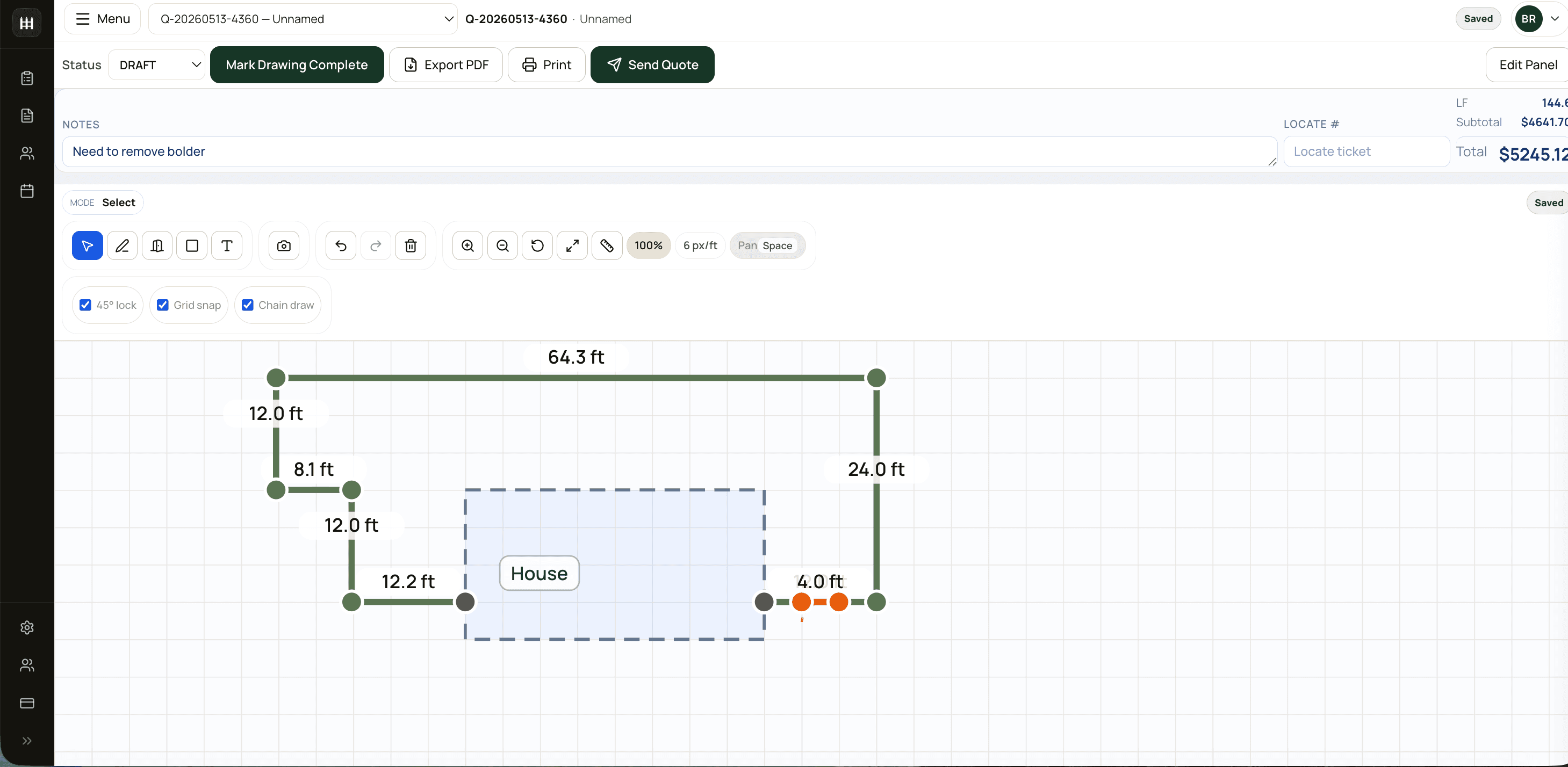
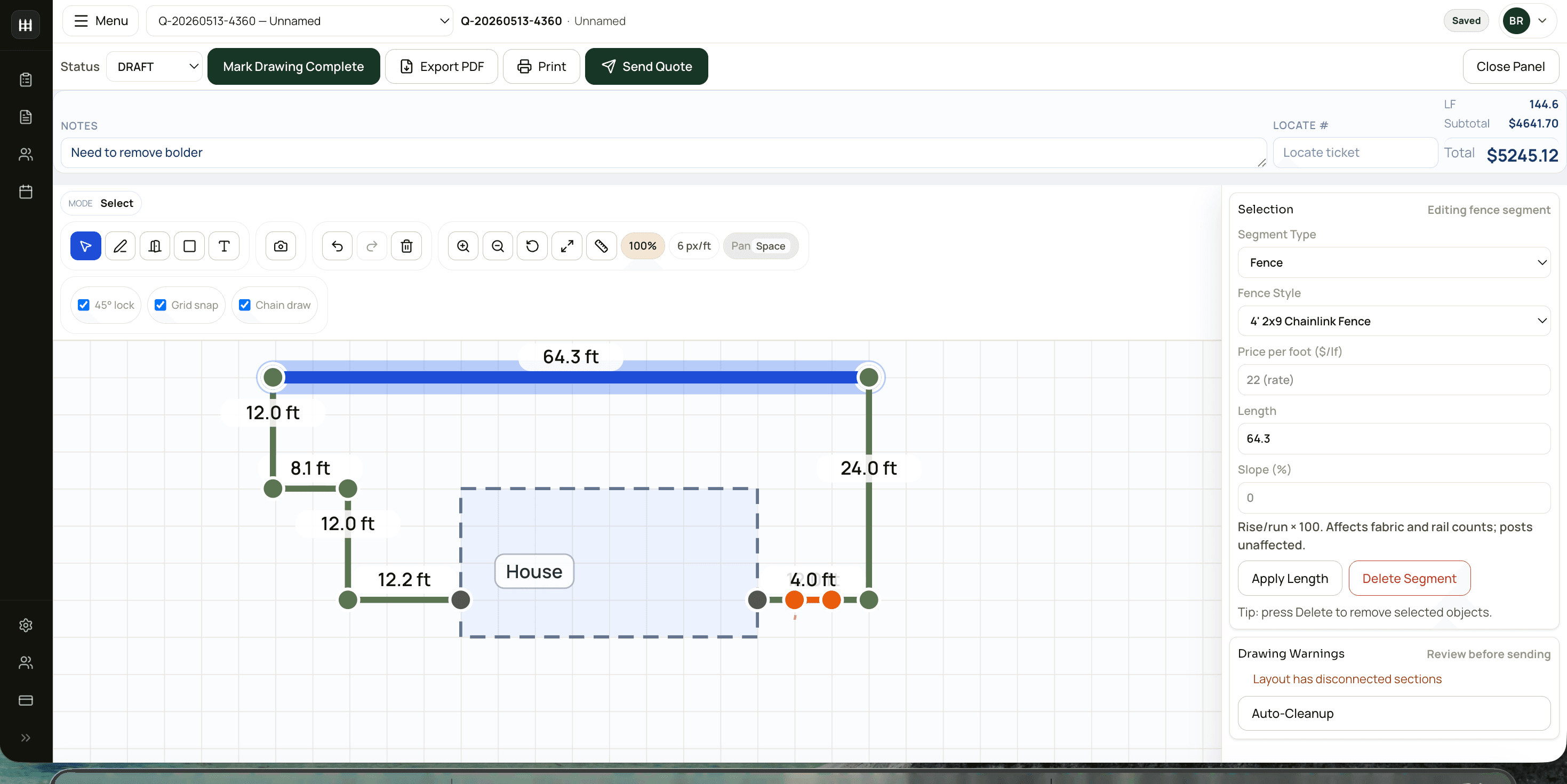
FenceTracer is fence estimating software in the literal sense — the drawing canvas IS the takeoff. Snap a layout on the canvas, the linear feet, post counts, gate hardware, and labour fall out automatically. US workspaces quote in USD with ZIP-backed sales tax checks or manual overrides; Canadian workspaces quote in CAD with HST, GST + QST, GST + PST, or GST-only defaults. The quote PDF is branded, sendable, and ready to send in 30 seconds.
Where it wins:
- Drawing-driven takeoff. Per-segment fence styles in a single quote (8' wood privacy on the property line, 4' picket out front).
- US sales tax and Canadian tax defaults handled before customer send.
- iOS + Android worker app for installer crews — today's jobs, drawing, material list, status updates back to the office.
- Plans from $59 CAD/month — Company is $180 flat with unlimited users, no per-seat pricing, no onboarding fee. Cancel anytime.
- Pre-loaded fence catalogue, CSV import for Master Halco / Wholesale Fence Supply / Atlas.
Where it falls short:
- Not a multi-trade tool. If you do mostly decks and fences only occasionally, you'll want a broader product.
- Engineered shop-drawing depth isn't where commercial-only specialists will land.
- Newer to market than the enterprise players — feature pace is fast, but ecosystem integrations are intentionally narrow.
Read the deep comparisons: vs Joist · vs Jobber · vs JobNimbus · vs ArcSite · vs FenceCloud · vs FenTek · vs QuoteMyFence · vs FenceCalc · vs Simpallo · vs Buildertrend
2. FenceCloud
Best for: US-based fence shops doing volume commercial/industrial work with heavy shop-drawing requirements.
Pricing: FenceCloud publishes $220 USD/month for Essential (1–3 users), $345 for Professional (4–10), and $545 for Ultimate (11–16), with monthly and annual billing options.
FenceCloud is fence-specific, US-built software with notable depth on the operations side and engineered shop drawings. For US commercial and industrial shops, this depth matters and FenceCloud handles it well. Canadian shops should compare the tax setup, currency, locate workflow, and installer handoff against FenceTracer's Canadian defaults.
Where it wins:
- Fence-native from the ground up — no adapting required.
- Stronger than FenceTracer on engineered shop drawings for commercial work.
- Mature catalogue management for US distributor SKUs.
Where it falls short:
- No Canadian sales tax automation (HST/QST/PST configured manually).
- USD-only currency.
- No native installer crew app on iOS/Android.
- Quote-to-send loop is slower than FenceTracer's drawing-driven flow.
Compare: FenceTracer vs FenceCloud
3. ArcSite
Best for: Multi-trade contractors (decks + fences + landscaping) who want one drawing app across all jobs.
Pricing: ArcSite publishes $119.99 USD/month for Takeoff and $159.99 USD/month for Estimates on monthly billing, with lower annual rates.
ArcSite is a flexible drawing app used across many trades. Its strength is freeform drawing across trade verticals — fence, decks, landscaping, irrigation. Its weakness for fence-only shops is that you build the fence-specific catalogue and rules yourself; the quote is bolted on after the drawing rather than falling out of it.
Where it wins:
- Genuinely useful across multiple trades — one app for fence and deck shops.
- Good touch drawing experience.
- Decent integration ecosystem.
Where it falls short:
- No fence-specific catalogue, slot mapping, or defaults out of the box.
- Per-user pricing in USD adds up fast for crews of 3+.
- No Canadian tax automation.
- No installer crew app.
Compare: FenceTracer vs ArcSite
4. FenTek
Best for: US fence companies that want AI satellite estimating, scheduling, invoicing, and operations in one newer product.
Pricing: FenTek's public site currently promotes a 14-day trial but does not clearly publish the paid plan prices. Request the current total before comparing costs.
FenTek has one of the sharper modern pitches in the category: AI-powered fence quoting, satellite estimating, branded quotes, crew scheduling, invoicing, and operational insights. It is clearly fence-specific, and that matters. The fit question for US and Canadian shops is whether you want to maintain USD/CAD, tax setup, supplier pricebooks, locates, and installer handoff conventions yourself or use a fence-specific quote-to-install workflow out of the box.
Where it wins:
- Strong satellite-estimating story for remote quoting.
- Fence-specific operational feature set.
- Modern packaging around AI, scheduling, invoicing, and insights.
Where it falls short:
- US-oriented positioning and examples.
- Tax, currency, supplier, and locate workflows need closer validation.
- Newer-market claims should be tested against a real US or Canadian quote before switching.
Compare: FenceTracer vs FenTek
5. QuoteMyFence
Best for: Canadian fence companies that mainly want a customer-facing instant quote and lead capture tool on their website.
Pricing: QuoteMyFence publishes promotional pricing of $199.99 CAD/month, month-to-month.
QuoteMyFence is one of the most relevant Canadian competitors because it targets fence estimate software and lead capture directly. The workflow is homeowner-first: customers enter an address, draw on satellite imagery, get an instant estimate, and become a pre-qualified lead for the contractor. That is useful if your bottleneck is lead quality. It is less complete if your bottleneck is estimator workflow, internal material takeoff, scheduling, locates, and crew handoff after the quote is accepted.
Where it wins:
- Customer-facing satellite quote experience.
- Strong lead capture and pre-qualification angle.
- Canada-relevant positioning.
Where it falls short:
- More lead-widget than full fence company operating system.
- Contractor-side takeoff, crew scheduling, and worker handoff are not the core pitch.
- Pricing is higher than FenceTracer's plans (from $59 CAD/month) if you need full quoting + operations.
Compare: FenceTracer vs QuoteMyFence
6. FenceCalc
Best for: Contractors who want a lightweight fence layout and material takeoff tool without full CRM, scheduling, or quote operations.
Pricing: FenceCalc publishes $50 USD/month with unlimited quotes and no contract for its current takeoff product.
FenceCalc is simple and direct: sketch a fence layout, pick materials, and generate a takeoff. It also speaks to AU/CA readiness, which is useful if you need metric/local configurations. For US and Canadian fence companies, the tradeoff is depth: FenceCalc is closer to a takeoff utility than a quote-to-install operating system.
Where it wins:
- Simple fence takeoff workflow.
- Low monthly price.
- AU/CA support messaging.
Where it falls short:
- Pricing and labour depth is still evolving publicly.
- No full US/Canadian tax, quote PDF, pipeline, scheduling, or worker app stack.
- USD pricing and lighter operations footprint.
Compare: FenceTracer vs FenceCalc
7. Simpallo
Best for: Commercial fence estimators who work from plan sets, PDFs, bid calendars, and material lists.
Pricing: Simpallo publishes Core at $30 USD/user/month and Essentials at $100 USD/user/month, with no onboarding fee or contract.
Simpallo is purpose-built for commercial fence estimation, especially drawing directly on plans, PDFs, satellite views, hand drawings, or grid space. It is a serious fit for companies bidding plan-based commercial work. FenceTracer is stronger when the workflow is residential or light-commercial site visits, fast USD/CAD quotes, tax-correct PDFs, and crew handoff.
Where it wins:
- Commercial fence plan/PDF estimating.
- Product configuration and material list output.
- Bid calendar and project document organization.
Where it falls short:
- Less focused on instant customer quote PDFs from a site sketch.
- US/Canadian tax, USD/CAD quoting, and worker app handoff are not the center of the product.
- Overkill for residential fence shops that quote in the truck.
Compare: FenceTracer vs Simpallo
8. Joist
Best for: Sole-operator handymen and small mixed-trade crews who quote line-by-line.
Pricing: Joist publishes Basics at $10 USD/month, Pro at $17, and Elite at $32 on monthly billing, with lower annual totals.
Joist is a clean, simple line-item estimating and invoicing app. For a one-person handyman business that quotes mixed work and primarily needs invoicing and payments, Joist is hard to beat. For fence work, the gap is obvious — there's no drawing tool, no fence-specific takeoff, and tax setup is manual per invoice. Fence shops that adopt Joist usually end up running a spreadsheet alongside it for the math.
Where it wins:
- Simple, fast, low-overhead.
- Joist Payments for credit card and ACH built in.
- Free tier for very small operators.
Where it falls short:
- No drawing tool. No fence takeoff.
- No fence-specific catalogue or slot mapping.
- Manual tax setup; not fence-native.
- Designed around line-by-line scopes, not measured fence quotes.
Compare: FenceTracer vs Joist
9. JobNimbus
Best for: Multi-trade contractors (roofing, siding, exteriors) who already use JobNimbus as a CRM.
Pricing: JobNimbus now uses request-a-quote pricing across Essentials, Pro, Premium, and Enterprise plans. Its public page lists a 14-day trial but no dollar amount.
JobNimbus is a capable general-purpose contractor CRM. Roofers and siding contractors use it heavily and successfully. For fence work, the same caveats keep coming up: no fence drawing tool, no fence-specific defaults, and local tax setup needs to be configured and maintained rather than derived from fence quote context. Shops already standardized on JobNimbus across multiple trades sometimes keep it for CRM/pipeline and use FenceTracer alongside it for the estimating step.
Where it wins:
- Deep, broad CRM with lead capture, automations, reporting.
- Excellent third-party integrations (QuickBooks, Zapier, EagleView).
- Mature mobile app for sales reps.
Where it falls short:
- No fence drawing tool or takeoff.
- Per-user pricing in USD scales poorly for crew-heavy operations.
- Canadian province tax requires manual setup and ongoing rate maintenance.
- Generic CRM mobile app rather than a dedicated installer crew app.
Compare: FenceTracer vs JobNimbus
10. Buildertrend
Best for: Home builders, remodelers, and GCs running multi-month projects with subs and draws.
Pricing: Buildertrend currently uses custom quote pricing and does not publish a dollar amount on its pricing page. Confirm subscription, onboarding, and term details directly.
Buildertrend is mature construction management software with deep capability in builder workflows — change orders, schedule of values, draw schedules, deep accounting integration. None of that is the fence-shop daily workflow. For most fence contractors, Buildertrend is in the wrong weight class: too much functionality, too much onboarding cost, too much subscription cost, and still no fence-specific takeoff.
Where it wins:
- Best-in-class for true builder workflows (multi-month, multi-sub, draws).
- Deep QuickBooks/Xero job-costing integration.
- Comprehensive document management.
Where it falls short:
- No fence-specific takeoff or drawing tool.
- Pricing model + onboarding fee is overkill for fence shops.
- Annual commitment is uncommon for fence contractor tooling.
- Steep learning curve relative to fence-shop time budgets.
Compare: FenceTracer vs Buildertrend
11. Jobber
Best for: Multi-trade home-service businesses (landscaping, decks, cleaning) that need scheduling, payments, and client communication in one platform.
Pricing: Jobber publishes USD pricing by team size — roughly $49/mo Core (1 user), $199/mo Connect (5 users), $299/mo Grow (10 users), $499/mo Plus (15 users), with annual discounts. Card payments add ~2.9% + 30¢ per transaction.
Jobber is the most popular home-service platform in North America, and for good reason: scheduling, online booking, invoicing, payments, client hub, and automated follow-ups are genuinely excellent. But it is a generalist tool. Quotes are built from line items you type in — there's no fence drawing, no per-segment material logic, and no place-of-supply tax handling. Fence shops on Jobber still do their takeoff math somewhere else and re-key the result into the quote.
Where it wins:
- Best-in-class scheduling, payments, and client communication.
- Deep CRM with automated follow-ups and a marketing suite.
- 100+ integrations including QuickBooks, Xero, Gusto, and Home Depot.
Where it falls short:
- No fence drawing or takeoff — measurements are entered, not derived.
- No fence-specific material recipes or supplier slot mapping.
- Tax is configured at the account level, not derived from the install address.
- Per-team-size USD pricing scales up as you add crews.
Compare: FenceTracer vs Jobber
What to look for in fence estimating software
If you're shopping the category, three questions cut through the marketing:
- Does the linear-foot number on the quote come from a measured drawing? If not, you're going to re-key it forever. Drawing-driven takeoff is the difference between a 30-second quote and an hour-long one.
- Is tax handled before send? US jobs need ZIP-backed sales tax checks or manual overrides. Canadian jobs need HST, GST + QST, GST + PST, or GST-only by province. Software that makes you configure rates per quote is software that will produce a mis-taxed quote eventually.
- Does the crew see what the estimator built, on their phone? Without that, you'll keep printing drawings and texting addresses. Cut the office-to-truck loop and your install day stops starting at 9:30am.
If a tool you're evaluating doesn't have a clean answer to all three, you're going to spend the savings you thought you were getting on workflow patches.
FenceTracer
Try the #1 pick free for 30 days
FenceTracer starts at $59 CAD/month Solo, $180 Company flat with unlimited users, no credit card to start, and starter pricing included. Build a drawing-driven quote on a real job and see the takeoff fall out.Related reading
- Fence estimating software for contractors — the product overview for the complete sketch-to-install workflow.
- Compare FenceTracer to anything — every comparison page, in one index.