Most fence shops grow until the owner becomes the bottleneck — answering calls, writing quotes, ordering materials, dispatching crews, chasing payment, and trying to swing a hammer when someone calls in sick. Getting past that ceiling is what separates a fence shop the owner runs from a fence shop that runs without the owner present.
This guide covers the daily and weekly cadence of a well-run fence shop: how scheduling actually works, how crews stay coordinated, what the back office should automate, and which decisions deserve a meeting versus a quick message.
References to FenceTracer reflect a working implementation. The operations principles apply to any tool you use.
Scheduling and dispatch
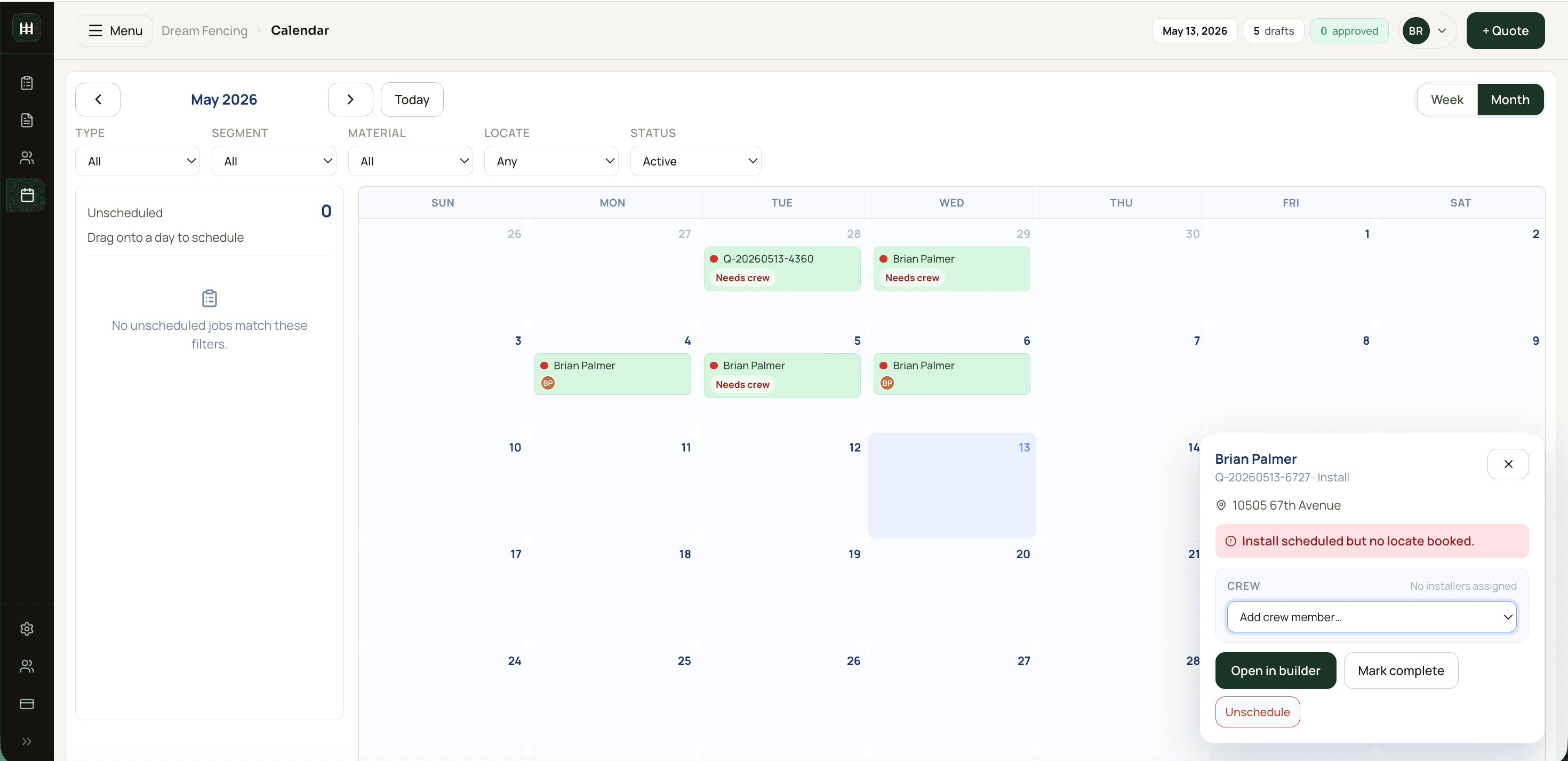
A fence-shop schedule has shape. It's not "appointments on a calendar" — it's three different event types (site visits, installs, repairs) running across multiple installers, in geographic clusters, blocked by locate-call status. Generic scheduling tools mash these into a single appointment type and lose the structure that makes dispatch tractable.
Resource-timeline view by installer × day
Rows are installers, columns are days. You can see at a glance who's booked, who's free, and where you have flex. Generic week-view calendars hide the conflicts you need to see. A 200-LF wood privacy fence is a 2–3 day job — show it as a multi-day block on the same crew, not three separate appointments to be re-scheduled if day one slips.
Locate-call status blocks scheduling
An install scheduled before the locate is cleared is a fineable mistake waiting to happen. The schedule view should show locate status per job and refuse to confirm an install date until the locate is cleared. If your tool treats this as a soft suggestion rather than a hard guard, you'll skip it on a busy day and pay for it on a worse one.
Drag-and-drop reschedule
When weather kills Tuesday, the dispatcher should be able to drag the job from Tue to Thu and have everything (material delivery, locate window, crew assignment) update accordingly. Re-keying the same job in four places is how dispatch errors enter.
Geographic batching
Three site visits in the same neighbourhood beats one visit a day across the city. Batch them by postal code or area, and your estimator's drive time drops 50%. Some fence shops batch all site visits to two days a week (Tuesday and Friday, say) to maximize this. The upside compounds.
Buffer between confirm date and install date
Promising "we'll install on the 15th" on the 14th is a recipe for missed dates. Build 1–3 days of buffer between the customer-confirmed date and your scheduled date. Promise late, deliver on time. Customers tolerate small slips and surprise on-time deliveries; surprise reschedules wreck trust.
24-hour customer reminder
Automated SMS the afternoon before: "Your fence install is tomorrow morning, expect the crew between 8–9. Reply if anything changed." Cuts day-of cancellations significantly and signals professionalism.
Read-only schedule for crews on mobile
Installers should see their week without having to ask the dispatcher. A read-only mobile view of their assigned jobs cuts morning-of-Monday phone calls dramatically. The dispatcher's time is better spent on Tuesday's fires than re-explaining Monday's schedule.
Daily and weekly cadence
Two short meetings a week prevent a dozen mid-week fires.
Friday plan-the-week meeting
30 minutes on Friday afternoon. Walk through next week's jobs, locate-call status, material orders, and crew assignments. Catches problems while there's still time to fix them — a Tuesday locate that hasn't been requested becomes Monday's fire if not surfaced Friday.
Monday morning crew briefing
10 minutes before crews leave: today's job list, special instructions, customer notes, locate confirmations. A briefing is more reliable than a text thread that gets lost. Every crew lead leaves the briefing knowing exactly what their day looks like.
End-of-day update from each crew
A 30-second "completed / hours / issues" update from the crew lead before they head home. The dispatcher walks into Tuesday already informed about Monday's outcomes, which means Tuesday's plan is already adjusted by 8 AM rather than 10 AM.
Monthly review of margin and capacity
Once a month: gross margin trend, win rate, average time-to-quote, crew utilization. 30 minutes of looking at the numbers prevents a quarter of running blind. The tool you use should produce these as reports, not spreadsheets you build.
Annual financial review
November, not April. 90 minutes with your accountant if your books are clean during the year. The right time is before year-end so you can adjust if needed, not after when you're locked in.
Customer handoff that prevents callbacks
The handoff from sales to operations to install is where bad fence shops lose customers. Good ones make it boring.
Standardized install checklist
A printable per-job checklist (dig depth, post spacing, gate hardware, customer walkthrough) ensures every install meets the same standard regardless of which crew shows up. Consistency is what turns a fence shop into a brand.
Photo evidence at every job
Before-and-after photos at every install protect against disputes and double as marketing content. Store them on the job record so they're findable later. The photo habit takes 30 seconds and pays off the first time a customer claims the work wasn't done correctly.
Customer walkthrough at completion
Crew lead walks the homeowner around the finished fence at handoff. Catches the small punch-list items that would otherwise become callbacks. "The latch is slightly stiff" caught at handoff is a 30-second adjustment; the same complaint two weeks later is a $200 truck roll.
Don't bill until customer signs off
Walk-away signoff (in person or via a quick reply text) before the invoice goes out. Disputes after invoice are 10× harder to resolve than concerns surfaced on the spot.
Followup at 30, 90, 365 days
30-day quality check email. 90-day satisfaction survey. 365-day check-in (and gentle ask for a referral or review). Sets up repeat work and steady review flow without being pushy.
Materials, suppliers, and yard
Order Friday for next week's jobs
Ordering Friday with weekend lead time absorbs supplier delays. Mid-week ordering creates Tuesday-morning emergencies. Make this a standing rule, not a case-by-case decision.
Auto-generated material list per job
An auto-generated material list — exact post counts, fabric LF, gate kits, fittings — beats a generic "usual stuff" order. It avoids over-stocking and missing items, and it makes per-job material reconciliation possible after the fact.
Stage materials at the yard the night before
Crews start 30 minutes faster when their materials are already on the truck or staged in a known spot. Cut dead time at the start of every install day. The 30 minutes adds up to a full day per crew per month.
Primary supplier plus backup
A primary supplier with the best price, plus a backup for stockouts. Two relationships protect you from supply-chain hiccups without diluting your spend leverage on the primary.
Negotiate quarterly
Quarterly check-ins with the rep keep your account top of mind. Most contractors negotiate once a year; quarterly is the unfair advantage. Track delivery accuracy (late, wrong, damaged) so the next renegotiation has data, not opinion.
Lean inventory
Holding cost on a yard full of fence material is real. Most fence work can run lean — order what's quoted plus a small buffer for callbacks. The cash flow improvement compounds.
Yard organization is operations
Labels on bins, organized racks for fittings, painted floor lines for material types. The 30 minutes saved at the start of every install day adds up. Yard layout is operations the way schedule is — invisible when it's good, expensive when it's not.
When to hire which role
Operations capacity has a sequence:
- Sole operator → 1 crew + dispatcher at ~30 jobs/year. The dispatcher handles scheduling, locate calls, customer comms, and ordering. Frees the owner to estimate and run sales.
- + Second estimator at ~80 jobs/year. Owner-as-only-estimator is the #1 growth bottleneck. Cross-train early so the business doesn't run on one person's calendar.
- + Second crew at ~130 jobs/year. Geographic split usually makes sense; one crew handles north of city, one south.
- + Office admin at ~200 jobs/year. Invoicing, AR follow-up, supplier reconciliation, customer service. The role that lets the owner do less administrative work each year, not more.
These are rough numbers; your local market and average job size shift them. The point is the order — adding crews before adding the dispatcher just spreads the chaos.
FenceTracer
Operations tooling that handles fence-shop reality
FenceTracer's resource-timeline calendar treats site visits, installs, and repairs as separate event types, locate-call status as a first-class field, and surfaces the daily and weekly cadence that actually runs a shop. 30-day free trial.FAQ
Frequently asked questions
What's the best CRM for fence contractors?
Generic CRMs (HubSpot, Salesforce, JobNimbus) handle customer records but lack fence-specific workflow — drawing-driven takeoff, slot-mapped catalog, locate-call status, resource-timeline scheduling. Fence-specific tools like FenceTracer combine the customer record with the operations workflow in one system, which means estimators and dispatchers don't context-switch between tools. The 'best' CRM is usually the one that doesn't make you bolt three tools together.
How do I schedule fence installation crews efficiently?
Use a resource-timeline view (rows = installers, columns = days) so you can see capacity and conflicts at a glance. Treat site visits, installs, and repairs as separate event types with separate priorities. Make locate-call status a hard guard that blocks scheduling until cleared. Batch site visits by geographic area to cut drive time. Build 1–3 days of buffer between the customer-confirmed date and the actual scheduled date.
How do I track jobs through the pipeline?
Use a visible pipeline status: Quote → Sold → Scheduled → In Progress → Complete → Invoiced → Paid. Every job has a status; the team should see it without asking. A simple kanban or pipeline view in your software makes this real. Phone-tag for status is what kills throughput in 5+ person shops.
What's the right cadence for fence shop operations meetings?
Two short meetings a week. Friday plan-the-week (30 min, walk next week's jobs and locate status). Monday morning crew briefing (10 min before crews leave). Plus end-of-day updates from each crew lead (30 seconds, completed/hours/issues). Monthly margin and capacity review (30 min). Annual financial review with accountant (90 min in November, not April).
How do I prevent callbacks on fence installs?
Standardized install checklist for every job. Photo evidence before and after. Customer walkthrough at completion to catch punch-list items on the spot. Don't bill until the customer signs off. The cost of a callback (truck roll, crew time, customer goodwill) is 10× the cost of catching the issue at handoff.
When should fence contractors order materials?
Friday for next-week jobs. Weekend lead time absorbs supplier delays. Mid-week ordering creates Tuesday-morning emergencies. Make this a standing rule. Use an auto-generated per-job material list (post counts, fabric LF, gate kits, fittings) rather than a generic 'usual stuff' order — avoids over-stocking and missing items.
How do I manage multiple fence crews without losing track?
Resource-timeline scheduling (per-installer per-day grid), locate-call status as a first-class field, geographic batching by postal code, and a Friday plan-the-week + Monday morning briefing rhythm. The visible pipeline status keeps every job's stage current. Read-only mobile schedule for crews cuts dispatcher phone time. The whole system is what scales — not any one feature.