Fence Company Management Software for US and Canadian Contractors
Fence company management software should connect the whole job: lead, drawing, estimate, quote, approval, scheduling, locates, crew handoff, job updates, and closeout. If estimating is in one place and operations are in another, the office still spends the day chasing details.
FenceTracer is built for US and Canadian fence companies that want the estimate and the job record to stay together. The drawing creates the takeoff, the takeoff creates the quote, the accepted quote moves into scheduling, and the crew sees the drawing and material list on the worker app.
This page covers the business side of running a fence company. For the wider product overview, including estimating and quoting, see fence contractor software.
Pipeline
Quote status trackingCalendar
Install schedulingLocates
Readiness checksWorker app
Field updates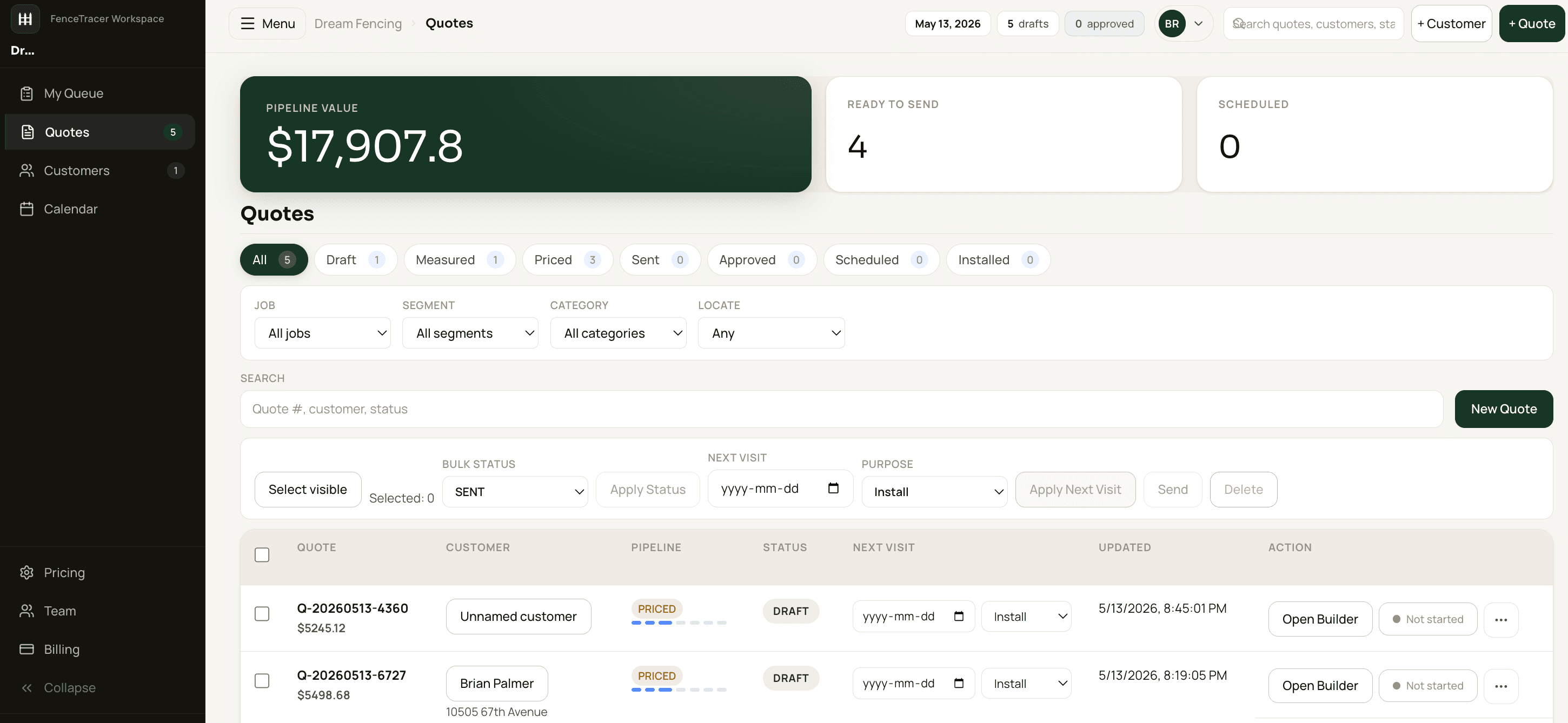
What management means in a fence company
Running a fence company is two jobs in two places.
In the office, it's the pipeline and the calendar: returning leads, booking site visits, sending and chasing bids, taking deposits, ordering materials, requesting locates, scheduling installs, and answering "when is my fence going in?" calls.
In the field, it's the crew knowing where to go, what's on the truck, which side the gate goes on, and whether the locates are marked, then telling the office what got done.
Things usually go wrong in the handoff: the gate that moved in a revision but not on the crew's copy, the job sold but never scheduled, the install booked before the locate came back. Good fence business management software gives the office and the field one record to work from.
What fence company management software needs to manage
General contractor CRMs can track contacts and tasks. Fence companies need that, plus the fence-specific job details:
- Drawing and material takeoff tied to the customer record.
- USD/CAD quote totals, deposit terms, and quote approval.
- US sales tax checks or Canadian HST/GST/QST/PST defaults based on the install location.
- Supplier pricebook and margin visibility.
- Locate status and install-date readiness.
- Crew calendar and job assignment.
- Worker app with the drawing, material list, address, notes, and update buttons.
FenceTracer is deliberately narrower than enterprise field-service software. It does the fence workflow deeply instead of asking a small shop to configure a huge generic system.
The fence job lifecycle, stage by stage
Fence job management software should show where every job sits without anyone asking. In FenceTracer, the quote pipeline runs Draft → Sent → Accepted → Invoiced → Closed, and the calendar and worker app carry the job through the install.
- Lead and site visit. Create the customer and install address, and book the site visit on the calendar.
- Draft. The estimator draws the layout and the takeoff builds from it, priced from your catalogue. That's the fence estimating software side of the job.
- Sent. The branded PDF and approval link go out, and follow-up reminders on open quotes keep the bid from going quiet.
- Accepted. The customer approves in the browser, and the job lands in the unscheduled queue with its drawing and material list. The office takes the deposit, orders materials, and requests locates.
- Scheduled and installed. The office drags the job onto a day and assigns a crew. Installers work from the worker app and send status updates back.
- Invoiced. The finished job moves to Invoiced, so billed and unbilled work are easy to tell apart.
- Closed. The job stays in the customer's quote history for the next call, warranty question, or repeat job.
From quote pipeline to install calendar
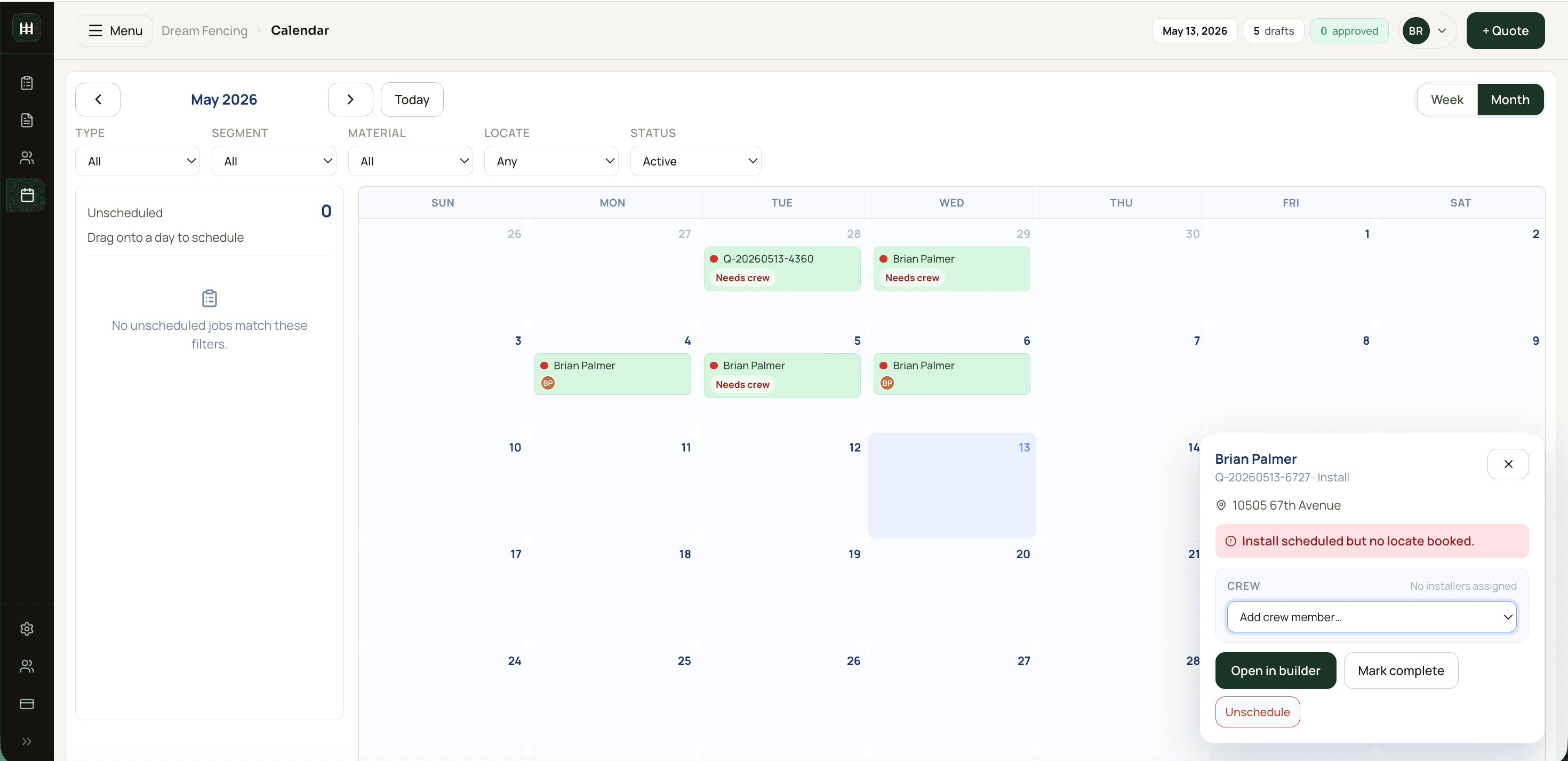
The job should not be rebuilt after the customer says yes. In FenceTracer, accepted quotes carry forward into the install workflow. The office can schedule the job, assign crews, watch for missing locates, and keep the material list attached to the same record.
That matters most during busy season. If a crew has to call the office for the drawing, address, material list, or gate notes, the software failed. FenceTracer's worker app gives installers the job context without exposing them to the whole back office.
Busy-season scheduling problems
In much of Canada and the northern US, frozen ground slows or stops post-hole digging for part of the winter, so installs crowd into the months after the thaw. That's when the schedule breaks:
- An invisible backlog. Accepted jobs sit in an inbox, and customers call for dates the office can't give.
- Locates not back. The crew shows up and there are no marks on the ground.
- Weather days. One rained-out day pushes every job behind it, and multi-day installs slide.
- Double-booked crews. Two jobs on one crew, or an installer booked during time off.
FenceTracer's unscheduled queue shows every accepted job without an install date. The drag-and-drop calendar has week and month views by crew, with conflict and locate warnings on every job, so a rained-out day means dragging jobs rather than rebuilding the week. Time off sits on the same calendar. See fence crew scheduling software for how trucks, tool checks, and Live Crew fit in.
What owners should look at every week
A short weekly review catches problems while they're still cheap to fix:
- Pipeline by status. Bids stuck in Draft, Sent bids due for a follow-up, and what the open pipeline is worth.
- Accepted jobs with no install date. Each is a customer waiting on a date; check how long the oldest has waited.
- Jobs waiting on locates. Anything booked in the next two weeks without locates back is at risk.
- The next two weeks by crew. Conflicts, time off, and multi-day jobs that could slip.
- Finished work not yet invoiced. Money earned but not billed.
- Hours and trucks. Missed clock-outs on the weekly hours sheet, and whether truck and tool checks are getting done.
In FenceTracer, most of that list is already on screen: pipeline status and value, the unscheduled queue, calendar warnings, crew status updates, and the weekly hours sheet. For the full daily and weekly rhythm, see the complete operations and crew management guide.
Rolling out software without disrupting the season
If you can, switch when installs slow down rather than mid-backlog. Either way, roll it out in layers:
- Prices first. Use starter pricing or import your supplier catalogue, or have FenceTracer's team load your price sheet and set up your fence styles and rates at no extra cost.
- New bids next. Run one real quote through the whole workflow, then send new bids from FenceTracer while jobs already in flight finish where they are.
- Office and calendar. Schedule newly accepted jobs in FenceTracer and set up your trucks and crew accounts.
- Crews last, but soon. Move installers onto the worker app; the FenceTracer team walks them through clock-in and their first job.
FenceTracer is 30 days free with no credit card, then $59 CAD / $45 USD per month for Solo quoting or $180 CAD / $129 USD per month for the Company plan, and on Company adding estimators, office staff, or installers doesn't change the bill. Your trial data carries over if you subscribe.
Evaluation checklist
Run a real job through any software you're considering and check:
- Does the estimate come from a drawing, or does someone type quantities in?
- Does an accepted quote become the scheduled job without re-keying?
- Can you see every accepted job that doesn't have an install date?
- Are locates part of install readiness, or a note someone has to remember?
- What does the crew see on their phone, and can they send updates back?
- Does it handle your tax, your currency, and your supplier's catalogue?
- Is it priced per user or per company?
- Who does the setup, and can you try it on real jobs before you pay?
FenceTracer vs general CRM software
| Feature | FenceTracer | Generic contractor CRM |
|---|---|---|
| Fence estimate source | Drawing-driven takeoff and quote | Manual line items or attached files |
| Tax setup | US sales tax + Canadian tax defaults | Manual setup and maintenance |
| Locates | Install readiness field and scheduling context | Generic task or note |
| Crew handoff | Worker app with drawing and materials | Generic mobile app or text messages |
| Pricing | Company $180 CAD/month flat, unlimited users; Solo $59 CAD | Often per-user and USD |
Who this is for
- US and Canadian fence companies outgrowing spreadsheets, whiteboards, and shared calendars.
- Owners who want quote status, pipeline value, and install schedule in one place.
- Shops with field crews who need drawings and material lists on their phone.
- Companies that want fence-specific operations without enterprise software cost.
FenceTracer
Run the fence job from estimate to install
FenceTracer connects drawing-driven quotes, USD/CAD pricing, tax-ready PDFs, pipeline, locates, scheduling, and worker handoff — from $59 CAD/month Solo, or $180 Company flat. 30-day trial, no credit card, starter pricing included.FAQ
Frequently asked questions
What is fence company management software?
Fence company management software helps contractors manage the full job lifecycle: customers, estimates, quotes, approvals, scheduling, locates, crew assignments, field updates, and closeout.
Does FenceTracer include scheduling?
Yes. FenceTracer includes an install calendar, crew assignments, unscheduled queue, and locate-readiness context so jobs do not get pushed to the field without the right information.
Does it replace a general CRM?
For many fence companies, yes. FenceTracer covers customer records, quote history, pipeline status, scheduling, and job handoff. It is not a broad marketing-automation CRM, but it covers the operating workflow most fence shops need.
Is the worker app included?
Yes. FenceTracer includes an iOS and Android worker app for installer crews so they can see today's jobs, drawings, material lists, addresses, and update controls.
What should a fence company owner review every week?
Pipeline by status, accepted jobs without an install date, jobs booked in the next two weeks that are still waiting on locates, crew conflicts and time off, finished work that hasn't been invoiced, and missed clock-outs on the weekly hours sheet.
Can we switch software in the middle of busy season?
Yes, if you do it in layers. Start with new bids, let jobs already in flight finish where they are, and move crews onto the worker app once the office is comfortable. FenceTracer's team can load your prices and set up your trucks and crew accounts at no extra cost.
Related reading
- Fence contractor software — estimating, scheduling, and field ops
- Fence estimating software — drawing-driven quotes
- Fence estimating app — field quoting workflow
- The Complete Operations and Crew Management Guide