Fence Bid Software Canada
Fence bid software should help contractors move from measurement to a bid the customer can approve. That means accurate takeoff math, current supplier pricing, margin visibility, Canadian tax, a professional quote PDF, and a job handoff once the bid is won.
FenceTracer is fence bid software for Canadian residential and light-commercial fence contractors. Draw the layout, price the work from your catalogue, apply HST/QST/PST from the install address, send the customer-ready bid, and keep the approved job connected to scheduling and the crew.
Bidding sits between fence estimating software, which works out quantities and cost, and fence quote software, which produces the customer document. What bidding adds is what wins the job and protects the margin: speed, clear scope and exclusions, clean revisions, and a won job that reaches the crew intact.
Quote PDF
Bid-ready outputCAD
Pricing and totalsMargin
Visible before sendCrew
Handoff after approval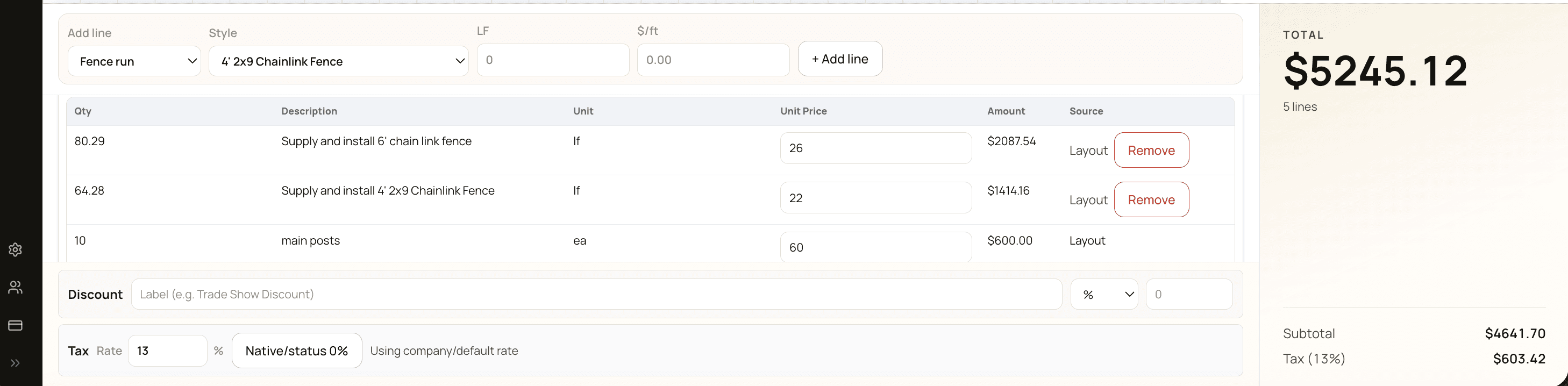
What goes into a fence bid
A fence bid has to price everything the crew will run into, not just the footage:
- Scope by run. Each run gets its own length, height, style, and material. Privacy on two sides and chain link across the back are separate scopes, not one per-foot number. Measure once on a drawing, which is what fence takeoff software is for, and footage, posts, and materials follow each run.
- Gates. Count, width, single or double, swing, and hardware. Price each one; a per-foot rate hides the heavier posts and install time.
- Removals and haul-away. Tear-out, pulling old posts and concrete, and dump fees. Price removal on its own line or exclude it in writing.
- Site conditions. Slope adds footage and means choosing stepped or racked panels. Rock, roots, and tight auger access add hours, so price an allowance or exclude them.
- Locates and permits. Say who requests utility locates and who pulls the permit. Public locates don't mark private lines, like a gas line to a barbecue, so say who handles those too. Pool enclosures often have their own bylaw rules.
- Tax. Tax follows where the fence goes in, not where your shop is. Show it on its own line.
- Deposit and terms. A deposit that covers materials, balance terms, how long the price holds, inclusions, exclusions, and warranty.
For the math behind the number (materials, labour, overhead, and margin, in that order), see how to price a fence job.
What good fence bidding software should include
A fence bid is more than a number. It needs to protect margin, answer customer questions, and give operations enough detail to build the job:
- Measured drawing or takeoff attached to the bid.
- Scope by fence type, height, length, gate count, removals, and extras.
- Supplier pricebook and labour rules behind the bid total.
- Margin visibility before the bid is sent.
- CAD subtotal, tax, deposit, and total.
- Branded PDF and customer approval link.
- Revision history when the customer asks for changes.
- Scheduling and crew handoff when the bid is accepted.
It should also keep everyone who bids, from the owner to a dedicated fence bid estimator, on the same prices, rules, and bid format.
Residential vs light-commercial fence bids
FenceTracer is strongest for residential and light-commercial fence bids where speed, accuracy, and follow-through matter. It is not trying to replace deep engineered shop-drawing software for heavy industrial work. The goal is to help a Canadian fence company send more accurate bids faster and avoid rebuilding the job after approval.
For commercial buyers, line-item visibility and material breakdowns can be shown when needed. For residential buyers, the same bid can keep the material detail behind the scenes and present a cleaner scope-first PDF.
Residential bids: scope first
Homeowners often compare several bids and want to see what they're getting, not a parts list. Lead with the layout drawing, describe each run in plain language ("82 ft of 6 ft cedar privacy with one 4 ft walk gate"), then list inclusions and exclusions, the total with tax, the deposit, and how to approve. The fence quote template lays out the sections homeowners look for.
Light-commercial bids: line-item detail
Property managers, builders, general contractors, and condo or strata boards often compare bids line by line. Give them quantities and unit pricing by run, add or deduct alternates priced separately, clear exclusions, the drawings or addenda your price is based on, and how long the price holds. Many will also want proof of insurance and a workers' compensation clearance, such as a WSIB certificate in Ontario, before awarding work.
Speed to bid and follow-up
A bid that arrives while the site visit is fresh is easier to say yes to. The fastest path is to bid on site: draw the layout on a phone, iPad, or laptop, review the takeoff, and send the PDF with an approval link before you leave the driveway. Bigger bids may still need a desk review, but the measuring and pricing are already done.
Then follow up; plenty of good bids go quiet because nobody called back. FenceTracer's pipeline shows which bids are still at Sent, and follow-up reminders on open quotes bring each one back on the date you set.
Revisions and alternates without re-keying
Customers often ask for changes before they approve: 5 ft instead of 6 ft, vinyl on the street side, one gate instead of two. In FenceTracer, you change the drawing, and the takeoff, price, tax, and PDF follow from the same measurements. FenceTracer keeps a revision trail, and the approval link is bound to a specific revision and records the customer's name and email, so it's clear which version was approved.
For true alternates, such as wood versus vinyl for the whole job, price each option from the same measured layout and label it clearly, so the only difference between the numbers is the product.
From won bid to scheduled job
Winning the bid is where many fence companies start retyping: the scope goes into a calendar, the material list gets rebuilt, and the crew gets a screenshot and a text. Each copy can lose the gate location or the removal note.
In FenceTracer, the accepted bid lands in the unscheduled queue with its drawing, material list, and notes attached. The office drags it onto a day, assigns the crew, and sees locate warnings before the truck rolls. Installers open it in the iOS or Android worker app.
How to bid a fence job in FenceTracer
- Load your prices once. Start on the built-in starter pricing (editable estimates, not supplier quotes), or import your supplier catalogue by CSV, map it to takeoff slots, and set your margins. Or send your price sheet and the FenceTracer team will set up your fence styles and rates.
- Add the customer and install address. The address sets the tax defaults: HST, GST + QST, or GST + PST in Canada, or US sales tax.
- Draw the layout. Trace runs, corners, and gates, and set the fence style for each segment. Footage (with slope added) and post counts update as you draw.
- Review the takeoff. Check line, end, corner, and gate posts, pickets or fabric, rails, concrete, and gate hardware. Anything not mapped to your catalogue stays visible, so fix it before sending.
- Add what the drawing can't see. Use quote lines for removal and haul-away, rock or access allowances, and permit fees.
- Check margin and presentation. Review margin, tax, deposit, and terms, then choose whether material line items show on the PDF.
- Send and follow up. Email the branded PDF with the approval link and set a follow-up date.
FenceTracer is free for 30 days with no credit card, then $59 CAD / $45 USD per month for Solo quoting or $180 CAD / $129 USD per month for the Company plan, with unlimited users on Company.
FenceTracer vs spreadsheet bidding
| Feature | FenceTracer | Spreadsheet bid workflow |
|---|---|---|
| Measured layout | Attached to quote and crew job | Separate sketch or PDF |
| Material pricing | Supplier catalogue with slot mapping | Manual rows and stale costs |
| Canadian tax | Automatic by install province | Manual lookup and formula risk |
| Revisions | Edit drawing or line item, regenerate | Copy file, edit formulas, export again |
| Follow-up | Reminders on open quotes | Memory, notes, or a separate list |
| After bid approval | Schedule, assign crew, share drawing/materials | Re-key into calendar and texts |
Who this is for
- Fence companies bidding enough work that spreadsheet drift is costing time or margin.
- Canadian contractors who need CAD bids with HST/QST/PST handled correctly.
- Estimators who want one workflow for drawing, takeoff, quote PDF, approval, and scheduling.
- Owners who need consistent bid packages across multiple estimators.
FenceTracer
Build fence bids from the drawing
FenceTracer helps Canadian fence contractors create quote-ready bids with CAD pricing, supplier pricebooks, Canadian tax, and crew handoff.FAQ
Frequently asked questions
What is fence bid software?
Fence bid software helps contractors prepare customer-ready bids from measurements, materials, labour, margin, tax, and scope. Fence-specific bid software connects the drawing or takeoff directly to the quote.
Does FenceTracer work for commercial fence bids?
Yes for residential and light-commercial bids that need measured layouts, material lists, line items, PDFs, and approval workflow. Heavy engineered shop drawings may still need a specialized commercial plan tool.
Can I show or hide material line items?
Yes. FenceTracer supports quote display choices so residential customers can see a clean scope while commercial buyers can receive more line-item detail when needed.
Does it handle Canadian tax on bids?
Yes. FenceTracer applies the right Canadian tax model from the install province, including HST, GST + QST, GST + PST/RST, and GST-only.
How fast can I get a fence bid out?
Often the same day, and sometimes before you leave the site. Draw the layout on a phone, iPad, or laptop, review the takeoff, and send the PDF with an approval link. Starter pricing means you don't need a finished pricebook before your first bid.
What happens when a customer asks for changes after the bid is sent?
Change the drawing or the quote lines and send the updated bid. FenceTracer keeps a revision trail, and the approval link is bound to a specific revision and records the customer's name and email, so it's clear which version was approved.
Related reading
- Fence quote software — proposal and PDF workflow
- Fence takeoff software — measured layouts to material lists
- Fence estimating software Canada — main software overview
- How to win more fence jobs — quoting speed, follow-up, and closing